

What's changed: Initial version
6.2Components and topology (switch, router, firewall, LB, and the three planes)
Covers the roles of the switch, router, firewall, and load balancer (LB); reading topology diagrams and interface/port values; and the view that splits a device into the management plane, control plane, and data plane—framed as the judgment of "which plane automation touches and which device along the path can stop an API call."
A topology diagram is a "map" for automation. Unless you can read which devices (switch/router/firewall/LB) line the path to the API endpoint your script calls, and which ports it traverses, you cannot decide where to look when it fails. Moreover, viewing a Cisco device as three planes—management plane, control plane, and data plane—lets you reason that "automation (NETCONF/RESTCONF/SNMP) touches the management plane, and even if that is blocked, real traffic (the data plane) keeps flowing." This section organizes device roles, reading topology and ports, and the three planes as a diagnostic framework.
6.2.1Device roles
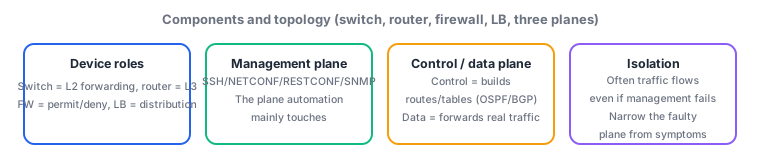
- A switch (L2; an L3 switch is L2+L3) handles same-segment frame forwarding and VLANs, while a router (L3) handles packet forwarding and routing between subnets/WAN. Automation management connections (SSH/NETCONF/RESTCONF) are usually made to these devices' management interfaces.
- A firewall permits/denies traffic by policy at the boundary. From automation's view, whether the firewall blocks API/management ports (443/830/22, etc.) is the most important gate. A load balancer (LB) distributes requests across servers for availability/scale, but since the actual responder behind one VIP can change each time, stateful APIs and health-check design need care.
- In a topology diagram, read each interface (e.g.
GigabitEthernet0/1), the devices at both ends, the IP subnets or VLANs it carries, and the port values (L4 ports, covered later). Reconstructing a path like "host -> GW -> firewall -> LB -> API server" from the diagram lets you ask which hop failed.
6.2.2The management, control, and data planes
- The management plane is the surface for configuring/monitoring the device—SSH, SNMP, NETCONF, RESTCONF, Syslog, etc.—and it is mainly what automation touches. Even if it is blocked/overloaded, existing forwarding often keeps running.
- The control plane builds paths and forwarding tables—routing protocols (OSPF/BGP), STP, ARP/MAC learning—and decides the forwarding information the data plane uses. The data plane actually forwards real user traffic, moving packets/frames at high speed per the tables the control plane prepared.
- Separating the three planes helps diagnosis: "cannot configure via
NETCONFbut traffic flows" is a management-plane issue; "a route vanished and it is unreachable" is a control-plane issue; "the path exists but only a specific flow drops" is a data-plane/ACL issue—so you can isolate which plane is at fault.
Key points: automation (SSH/NETCONF/RESTCONF/SNMP) touches the management plane; the control plane builds routes/forwarding tables (OSPF/BGP/STP/ARP); the data plane forwards real traffic; behind one LB VIP the responder can change; a firewall on the path can block management/API ports. Practice reading interface names, subnets, VLANs, and port values from topology diagrams.
Suppose your monitoring automation keeps getting No response when polling a router over SNMP (UDP/161). At the same time, business traffic through that router flows normally and there are zero user-reported outages. Here the topology diagram and the three-plane view pay off. You can isolate that "real traffic is fine = the data plane is healthy" and "config changes and routes are normal = the control plane is running too," so the problem is confined to the management plane that automation touches. Tracing the topology, there is a boundary firewall between the monitoring server and the router, and a recent policy change fails to permit UDP/161 (SNMP) to the management segment. Business traffic (data plane) takes a different path/policy, but only the monitoring management-plane traffic is dropped at the firewall. Rushing on-site assuming "the router is down" would be an overreaction; the symptom (data plane fine, only management plane down) tells you the fault plane. Even if the firewall were not the cause, the next suspects live inside the management plane—whether the router throttles SNMP via management-plane protection (CoPP: Control Plane Policing) or an ACL, or a mismatch in snmp-server community/version—all independent of the data plane. Reconstruct "which device and port the management traffic traverses" from the topology, then narrow "which plane is at fault" with the three-plane view—this two-step is the fastest way to isolate automation reachability trouble.
| Plane | Main functions/protocols | Relation to automation | How a fault here appears |
|---|---|---|---|
| Management plane | SSH/SNMP/NETCONF/RESTCONF/Syslog | The plane automation mainly touches | Cannot configure/monitor, but traffic flows |
| Control plane | OSPF/BGP, STP, ARP/MAC learning | Builds forwarding tables (reflects automated config) | Routes vanish/convergence breaks, unreachable |
| Data plane | Actual packet/frame forwarding, ACL | Real user/app traffic | Path exists but only a specific flow drops |
Trap: "SNMP/NETCONF not responding means the device is down and all traffic is cut" is wrong—automation touches the management plane, and even if it is blocked/overloaded, data-plane real traffic often keeps flowing. Also wrong: "if the LB VIP answers ping, every backend is healthy"—an LB distributes among servers behind one VIP, so intermittent failures can occur when only some backends are unhealthy.
6.2.3Section summary
- Read the path devices (switch/router/firewall/LB) and the interfaces/subnets/VLANs/ports they carry from the topology, and ask which hop failed
- Think of a device as management plane (automation touches SSH/NETCONF/SNMP), control plane (routes/forwarding tables), and data plane (real traffic)
- Narrow the fault plane from symptoms: "management down but traffic fine" is management-plane, "a route vanished" is control-plane, "only a specific flow drops" is data-plane/ACL
Sign in to track progress — Log in.
Quick check
(just a quick review)Q1. Monitoring automation keeps getting `No response` polling a router over `SNMP` (UDP/161), while business traffic through that router is normal and there are zero user reports. Which fault plane does this point to, and what is the best next check?
Q2. An API service is exposed via a load balancer (LB) single VIP `203.0.113.10:443` with three backends behind it. Repeating the same request from an automation client mixes success and `502 Bad Gateway` irregularly. What is the best investigation approach?
Q3. You want to change a router's routing configuration via `NETCONF`. Which combination best describes the plane this operation acts on and where its result is reflected?
Keep track of your progress
The full study guide is free to read. Sign up free to practice with the question bank, track what you have read, review your mistakes, and highlight passages.