

What's changed: Initial version
6.1L2/L3 fundamentals (MAC, VLAN, IP, subnet, gateway)
As the prerequisite for an automation script or API client to actually reach its target, this section covers L2 MAC addresses and VLANs, and L3 IP addresses, subnet mask/prefix, routing, and the default gateway—framed as the connectivity diagnosis of "why can only this host not reach the API."
For someone writing automation, network fundamentals are not a memorization subject but the foundation for judging whether packets actually reach the API endpoint your script calls. When requests.get() times out, an ssh session will not open, or a NETCONF session fails to establish, the cause is often not an application bug but L2/L3 reachability. This section organizes MAC/VLAN (L2), which handle forwarding within one segment, and IP/subnet/routing/default gateway (L3), which handle reachability across segments, as tools for isolating "where it stops."
6.1.1L2: MAC addresses and VLANs
- A MAC address is a 48-bit L2 identifier burned into the NIC (e.g.
00:1A:2B:3C:4D:5E). Within one segment (same VLAN/subnet), a switch forwards a frame to the destination MAC. To a different subnet it cannot reach by MAC; L3 routing is required—confusing this leads to misdiagnosing "they are on the same switch yet cannot communicate." - A VLAN logically splits one physical switch into multiple broadcast domains. Different VLANs are separate segments at L2, so inter-VLAN traffic requires L3 (a router or an L3 switch SVI). If the automation host sits in a different VLAN from the managed devices but routing or a default gateway is not set, it cannot reach them even within the same building.
6.1.2L3: IP, subnet, routing, and gateway
- An IP address paired with a subnet mask/prefix (e.g.
10.1.10.20/24) determines the host's subnet./24is255.255.255.0, so10.1.10.0-10.1.10.255is one subnet. The host uses the mask to decide whether the destination is within its own subnet—if so it ARPs directly, if not it sends to the default gateway. - Routing is where a router consults its routing table and forwards a packet along the entry that matches the destination IP most specifically (the longest match); with no matching route the packet is dropped. The default gateway is the exit that handles "everything outside my subnet" (the entry to the
0.0.0.0/0default route); if it is wrong, all outbound communication fails. - The connectivity ladder: reachability within one subnet is an L2 problem (MAC/switch/VLAN), while reachability to another subnet is an L3 problem (IP/mask/route/gateway). Keep an isolation order: if "local works but far does not," suspect the gateway/route; if "even the same VLAN fails," suspect L2 or duplicate IPs.
Key points: within-subnet is L2 (MAC/VLAN), to-another-subnet is L3 (IP/route/gateway); different VLANs require L3 routing; if the destination is outside your subnet it goes to the default gateway; routing uses longest match and drops with no matching route. Know that /24=255.255.255.0, and how to read ip route / show ip route / ip addr.
Suppose you operate an inventory script running on a CI runner that fetches configuration from data-center routers over RESTCONF (HTTPS/443). One day, only from a newly added CI runner (IP 10.1.10.20/24, VLAN 10) do all calls to the routers (10.9.0.0/24, VLAN 90) return connection timed out. First isolate "app bug vs. L2/L3 reachability." Calling the same API from another host in the same data center (10.9.0.5/24, VLAN 90) succeeds, so the script and RESTCONF config are fine—the problem is specific to the runner's network. On the runner, ip addr shows 10.1.10.20/24 correctly, and ping 10.1.10.1 (the local-VLAN gateway) works, but ping 10.9.0.5 (another subnet) fails. Checking ip route (Linux) reveals the default-gateway entry (default via ...) is missing. The runner can reach within its own subnet (10.1.10.0/24) but, although 10.9.0.0/24 is "outside my subnet," it knows no exit (default gateway) and drops the packets without sending them. Because VLAN 10 and VLAN 90 are separate broadcast domains, L2 can never bridge them; L3 routing—a correct default gateway—is essential. The fix is a single default-gateway setting (10.1.10.1); thereafter traffic to 10.9.0.0/24 routes via the default route and RESTCONF recovers. The lesson: before blindly tweaking app retries or timeout values on seeing connection timed out, check the L2/L3 ladder in order—"is the destination inside or outside my subnet," and "if outside, is the gateway/route correct."
| Element | Layer | Role | Diagnostic hint |
|---|---|---|---|
| MAC address | L2 | Frame destination within one segment | If same-VLAN fails, suspect duplicate/L2 |
| VLAN | L2 | Logical segmentation (separate broadcast domains) | Inter-VLAN requires L3 routing |
| IP + subnet mask | L3 | Determines subnet (inside/outside test) | `/24=255.255.255.0`; beware wrong mask |
| Routing | L3 | Forwarding by longest match | No route means drop -> `show ip route` |
| Default gateway | L3 | Exit for anything outside the subnet | Suspect first when only remote fails |
Trap: "If they are on the same switch, they can always communicate" is wrong—different VLANs are separate broadcast domains, and inter-VLAN traffic needs L3 routing. Also premature is "cross-subnet failure means an app bug"; in reality it is often a missing default gateway or a wrong mask (e.g. intending /24 but set /25), so the inside/outside test or the route is broken.
6.1.3Section summary
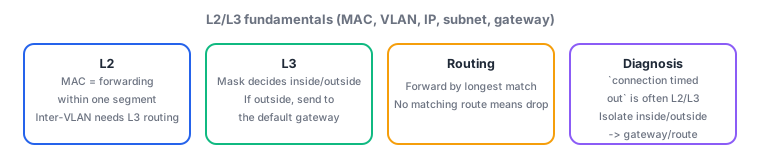
- Reachability within a segment is L2 (MAC/VLAN); across segments it is L3 (IP/subnet/route/gateway). Different VLANs require L3 routing
- A host uses the subnet mask to test whether the destination is local; if not, it sends to the default gateway. A wrong gateway/route drops all remote communication
- A
connection timed outis often L2/L3 reachability rather than the app. Isolating in order inside/outside -> gateway/route reaches the cause fastest
Sign in to track progress — Log in.
Quick check
(just a quick review)Q1. Only from a newly added CI runner (`10.1.10.20/24`, VLAN 10) do RESTCONF calls to routers on another subnet (`10.9.0.0/24`, VLAN 90) return `connection timed out`. The same API succeeds from another host (VLAN 90) in the same DC. On the runner, `ping 10.1.10.1` (its VLAN gateway) works but `ping 10.9.0.5` fails. What should you check first?
Q2. An automation host and a managed switch connect to the same physical switch, yet the host cannot reach the switch management IP. The host is in VLAN 10 and the management IP is in VLAN 90, with no L3 routing between them. Which explanation fits best?
Q3. A host `10.1.10.20` can reach `10.1.10.200` but not `10.1.11.5`. Its interface is configured as `10.1.10.20/25`. What is the most likely cause?
Keep track of your progress
The full study guide is free to read. Sign up free to practice with the question bank, track what you have read, review your mistakes, and highlight passages.