

What's changed: Revamped AZ-900 Chapter 4 to the new depth and added security coverage (Zero Trust/defense in depth/Defender for Cloud/RBAC/external ID) to the identity section
4.1Storage Services
Understand storage accounts and their four data services (Blob, File, Queue, Table), Blob access tiers (Hot/Cool/Cold/Archive), redundancy (LRS/ZRS/GRS/GZRS), and data migration tools.
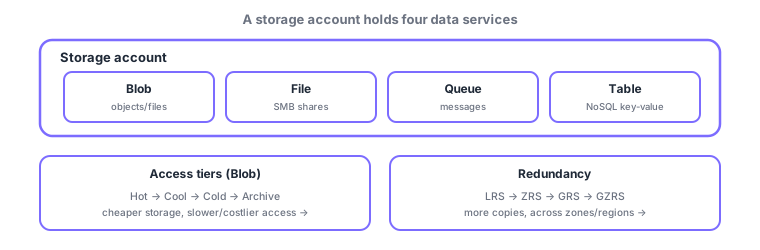
The container for cloud data is a storage account, which houses four data services (Blob, File, Queue, Table) for different purposes. You tune data along two axes: "access tiers" that lower storage cost, and "redundancy" that protects against failures. Understanding these two axes (cost vs availability) separately is the key to this section.
4.1.1Storage account and data services
A storage account offers four data services together; which you use depends on "what you want to store." Note that VM OS/data disks are provided by managed disks (a dedicated service built on Blob) and are separate from these.
| Service | Data kind | Typical use |
|---|---|---|
| Blob | Unstructured (objects) | Images, video, backups, logs |
| File | File shares (SMB/NFS) | Shared mount from many machines |
| Queue | Messages | Async messaging between components |
| Table | NoSQL key-value | Cheap, large structured data |
4.1.2Access tiers (the cost axis)
Blob access tiers optimize storage cost for "how often you read." Frequently read data goes in Hot; rarely read data in Cool/Cold/Archive. Lower tiers are cheaper to store but slower/costlier to retrieve (Archive in particular needs a time-consuming "rehydrate" to read).
| Tier | Access frequency | Storage cost | Retrieval |
|---|---|---|---|
| Hot | Frequent | Highest | Fast, cheap |
| Cool | Infrequent (30d+) | Lower | Somewhat costlier |
| Cold | Rare (90d+) | Low | Costlier |
| Archive | Almost never | Lowest | Slow, needs rehydrate |
4.1.3Redundancy (the availability axis)
Redundancy sets resilience by how many copies you keep and where. Levels range from copies within one site (LRS), across availability zones (ZRS), to another region (GRS), and both (GZRS). Lower options protect against broader failures (DC → zone → regional disaster) at higher cost.
| Option | Copy scope | Protects against |
|---|---|---|
| LRS | 3 copies in one site | Hardware/rack failure |
| ZRS | Across availability zones | Datacenter failure |
| GRS | Replicated to another region | Region-wide disaster |
| GZRS | Zones + another region | Zone failure + wide-area disaster |
4.1.4Data migration tools
- AzCopy: a command-line tool to copy/sync Blob and File data quickly.
- Azure Storage Explorer: a GUI tool to work with storage.
- Azure File Sync: syncs an on-premises file server with Azure Files.
- Azure Migrate: a hub to assess and run migrations of servers, databases, and more.
- Azure Data Box: ships data on a physical device when the volume is too large to transfer over the network.
Scenario: log retention design. Keep the last 30 days in Hot (you search them), then auto-move to Cool→Archive (lifecycle management) to cut cost. For audit/disaster needs, set redundancy to GRS (cross-region copy). Set the cost axis (tier) and availability axis (redundancy) independently.
Watch the mix-ups: (1) access tier (cost) vs redundancy (availability) are different axes—"cheaper → tier," "resilience → redundancy." (2) LRS is single-site only and does not replicate to another region (use GRS/GZRS for geo-disaster). (3) Archive is cheap but not instantly readable (rehydrate).
Q. Are VM disks one of these four services? No. VM OS/data disks are a separate service called managed disks (built on Blob internally). Remember Blob/File/Queue/Table are for "application data."
Common points: the four services (Blob = objects / File = shares / Queue = messages / Table = NoSQL), access tiers (Hot/Cool/Cold/Archive) vs cost/retrieval, redundancy LRS < ZRS < GRS < GZRS (GRS/GZRS replicate to another region), and Data Box = physical shipping.
4.1.5Section summary
- A storage account holds Blob / File / Queue / Table (VM disks are separate managed disks)
- Access tiers trade storage cost vs retrieval (Hot↔Archive)
- Redundancy = number/scope of copies (LRS<ZRS<GRS<GZRS); geo-disaster needs GRS/GZRS
- Migration: AzCopy / Storage Explorer / File Sync / Azure Migrate / Data Box (physical)
Sign in to track progress — Log in.
Quick check
(just a quick review)Q1. Which Blob access tier most cheaply stores rarely-accessed data long term?
Q2. Which redundancy replicates data to another region for geo-disaster protection?
Q3. Which migrates data too large to transfer over the network?
Q4. Which service best stores unstructured data (images, video, backups)?
Q5. Which correctly describes access tiers vs redundancy?
Keep track of your progress
The full study guide is free to read. Sign up free to practice with the question bank, track what you have read, review your mistakes, and highlight passages.