

What's changed: Revamped AZ-900 Chapter 2 to the new depth (geography, resource hierarchy, scope inheritance, ARM/IaC)
2.2The Resource Hierarchy (Management Groups, Subscriptions, Resource Groups)
Understand the hierarchy that organizes and governs Azure resources—management group > subscription > resource group > resource—and Azure Resource Manager (ARM), the layer you operate them through.
Once you start using Azure, resources (VMs, storage, databases) quickly grow into the hundreds or thousands. To organize them and govern permissions and cost, Azure provides a four-level hierarchy: management group > subscription > resource group > resource. Higher levels group broader scopes; lower levels approach individual instances. Understanding this nesting lets you see "where to apply a rule (policy or permission) and how far it reaches."
2.2.1The four levels
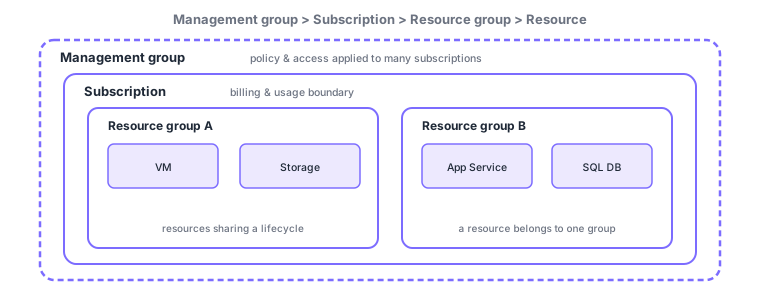
- Management group: the top-level container grouping multiple subscriptions. Apply policy and access control in bulk across the org or by division; can be nested.
- Subscription: the billing and usage boundary and a logical container for resources. It is the unit for invoicing and quotas, often split by department or environment (prod/dev).
- Resource group (RG): a container that groups related resources, managing permissions and lifecycle (e.g., delete together) as a unit. The group has a location for its metadata, but its resources may live in other regions.
- Resource: the individual service instance—a VM, storage account, database, etc. Each belongs to exactly one resource group (never multiple).
| Level | Role | Main use | Example |
|---|---|---|---|
| Management group | Group of subscriptions | Org-wide policy/access in bulk | "Prod" / "Dev" management groups |
| Subscription | Billing/usage boundary | Separate billing and quotas | Per-department subscriptions |
| Resource group | Container of resources | Manage access/lifecycle together | Group one app stack |
| Resource | Service instance | The actual running service | VM, storage, SQL DB |
2.2.2Scope and inheritance
Where this hierarchy pays off is scope and inheritance. Access control (RBAC) and Azure Policy can be assigned at any of the four levels and inherit (propagate) to everything below the level you assigned. For example, assign a "use only certain regions" policy at a management group, and it automatically applies to all subscriptions, resource groups, and resources beneath it. Broad rules go high, narrow rules go low—this is the basic governance strategy.
2.2.3Azure Resource Manager (ARM)
Azure Resource Manager (ARM) is the unified management layer that handles creating, updating, and deleting resources. Whether you enter via the Azure portal, Azure CLI, Azure PowerShell, SDKs, or ARM templates / Bicep, every request goes through ARM. That is exactly why consistent authentication, access control (RBAC), tags, and locks apply no matter which tool you use.
Another value of ARM is declarative templates (ARM templates in JSON, or Bicep, a more concise syntax). You write the "desired state" as code and apply it, and ARM realizes that state. The same template reproduces an identical environment any number of times, letting you manage configuration as code (IaC: Infrastructure as Code).
Note the governance tools ARM provides. Tags attach "key=value" labels to resources so you can classify and report across them by department, environment, cost center, and so on (useful for viewing cost across resource-group boundaries). Resource locks prevent mistakes by setting CanNotDelete or ReadOnly, guarding important production resources against accidental deletion or change. These can be set at the subscription, resource group, and resource levels and inherit downward.
In practice, deciding a naming convention and a tagging policy up front is the norm so you do not lose track of ever-growing resources. For example, a name like "env-app-region-type" and required tags (owner / costCenter / env) enforced by Azure Policy make later cleanup and cost allocation far easier.
Scenario: organizing a company. Create two management groups, "Prod" and "Dev," and apply common policies (allowed regions, required tags). Split subscriptions per department (finance, sales) to separate billing. Group each app into its own resource group and grant the team access at the RG level. Upper-level rules inherit org-wide, while access and billing are divided at the right granularity.
Watch the mix-ups: (1) subscription (billing boundary) vs resource group (container of resources)—split billing with subscriptions, manage together with RGs. (2) A resource always belongs to one RG (never multiple). (3) A management group is not a billing unit (it is a box for grouping and governance). Beware options that swap these roles.
Q. Why does a resource group have a region, and can its resources be in another region? The RG itself has a region for storing its metadata, but its resources can live in different regions. An RG is a "logical grouping," not a constraint on physical placement.
Common points: hierarchy order (management group > subscription > resource group > resource), subscription = billing boundary, resource group = container (a resource belongs to one RG), RBAC/Policy inherit below the assigned level, and ARM = the management layer all operations go through (IaC via templates/Bicep).
2.2.4Section summary
- Hierarchy: management group > subscription > resource group > resource
- Subscription = billing/usage boundary; resource group = container (a resource belongs to one RG)
- RBAC/Policy inherit below the assigned level—broad rules high, narrow rules low
- ARM = the unified management layer for create/update/delete; codify environments with templates/Bicep (IaC)
Sign in to track progress — Log in.
Quick check
(just a quick review)Q1. Which lists the Azure resource hierarchy correctly from the top?
Q2. Which is the billing and usage boundary (logical container for resources)?
Q3. Which management layer do all requests (portal, CLI, PowerShell, templates) go through?
Q4. Where does an Azure Policy assigned at a management group take effect?
Q5. Which correctly describes the relationship between a resource and a resource group?
Keep track of your progress
The full study guide is free to read. Sign up free to practice with the question bank, track what you have read, review your mistakes, and highlight passages.