

What's changed: Deepened AZ-700 Chapter 5 (ja figures; comparison tables/scenarios/FAQ/traps/deep paragraphs in all sections)
5.1Private Link and Private Endpoints
Understand Azure Private Link and private endpoints that bring PaaS (Storage, SQL, etc.) connectivity onto a private IP inside the VNet, plus the private DNS zone that backs name resolution. The goal is to reach PaaS without using the public path.
PaaS has a public endpoint by default. With Private Link, you bring PaaS connectivity onto a private IP (private endpoint) inside the VNet, bypassing the internet.
5.1.1How Private Link works
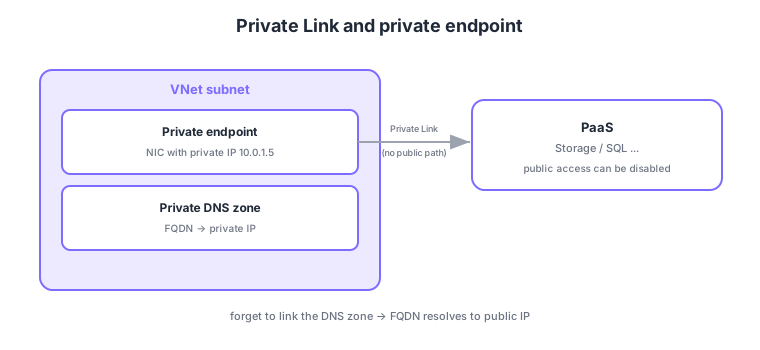
- Private endpoint: a NIC with a private IP in the VNet through which you reach the PaaS via that IP.
- Private Link: the platform that connects to PaaS via the private endpoint without the public path.
- Private DNS zone: resolves the PaaS FQDN to the private IP (nearly essential to integrate).
- Disable public access: disable the PaaS public endpoint to allow private-only access.
Common on AZ-700: bring PaaS onto a private IP = private endpoint (Private Link), FQDN → private IP resolution = private DNS zone, fully cut the public path = disable PaaS public access. Resolving from on-prem needs a DNS Private Resolver / conditional forwarders.
If you create a private endpoint but forget to link the private DNS zone, the FQDN keeps resolving to the public IP, unintentionally using the public path.
When you create a private endpoint, the PaaS public FQDN is rewritten via a CNAME to point at privatelink.<service>.core.windows.net (etc.), and the matching private DNS zone’s A record (auto-registered) resolves it to the private IP. A single PaaS resource may have multiple sub-resources (e.g., Storage blob/file/table/queue), each needing its own private endpoint and zone. Resolving from on-prem typically points a conditional forwarder at an inbound endpoint of the Azure DNS Private Resolver, and multi-VNet setups consolidate zones in a centralized hub DNS. You can apply an NSG to a private endpoint, but historically NSGs/UDRs didn’t apply by default; today you enable network policies (PrivateEndpointNetworkPolicies) to control it. Billing is per-endpoint hourly plus data processed, and on the PaaS side you can disable public network access to enforce “private-only.” This narrows data-exfiltration paths while giving consistent private reachability from on-prem and peered networks.
| Element | Role | Watch out |
|---|---|---|
| Private endpoint | NIC with a private IP in the VNet | One per sub-resource |
| Private DNS zone | Resolve FQDN → private IP | Forget to link → resolves to public IP |
| Disable public access | Cut the public path on PaaS | On-prem resolution needs a resolver |
Scenario: privatize both Storage blob and file and use them privately from on-prem. → Create separate private endpoints for blob and file, and link the privatelink.blob... and privatelink.file... zones to the VNet. Conditional-forward those zones from on-prem DNS to a DNS Private Resolver, and disable public access on the PaaS.
FAQ: Q. Can one private endpoint serve both Storage blob and file? → A. No—endpoints are per sub-resource, so blob and file need separate endpoints (and zones). Q. Do NSGs apply to a private endpoint? → A. Yes, once you enable network policies, NSGs/UDRs can apply.
Trap: “one private endpoint covers all of a PaaS’s sub-resources” is wrong—blob/file etc. need separate endpoints. Also “creating a private endpoint automatically closes the public path” is wrong—you must explicitly disable public access on the PaaS or the public path remains.
5.1.2Section summary
- Private endpoint = bring PaaS onto a private IP (Private Link)
- Use a private DNS zone to resolve FQDN → private IP
Sign in to track progress — Log in.
Quick check
(just a quick review)Q1. You want PaaS (Storage/SQL) connectivity on a private IP inside the VNet, not the public path. What do you use?
Q2. When using a private endpoint, what is needed to resolve the PaaS FQDN to the private IP?
Q3. You created a private endpoint but traffic still goes to the public IP. What is a common cause?
Keep track of your progress
The full study guide is free to read. Sign up free to practice with the question bank, track what you have read, review your mistakes, and highlight passages.