

What's changed: Deepened AZ-700 Chapter 4 (ja figures; comparison tables/scenarios/FAQ/traps/deep paragraphs in all sections)
4.2Network Monitoring with Network Watcher
Understand Azure Network Watcher for network visibility and diagnostics. Troubleshoot using tools like Connection Monitor, NSG diagnostics (flow logs), IP flow verify, and next hop.
Troubleshooting networks hinges on isolating "where it breaks." Network Watcher provides tools to visualize and diagnose connectivity, routing, and NSG allow/deny.
4.2.1Network Watcher diagnostic tools
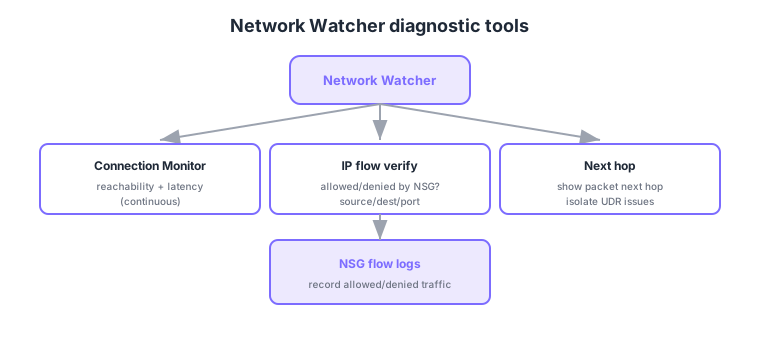
- Connection Monitor: continuously monitor reachability and latency between endpoints.
- IP flow verify: determine whether a specific source/destination/port is allowed or denied by NSGs.
- Next hop: show the next hop for a packet to isolate UDR issues.
- NSG flow logs: record allowed/denied traffic for analysis (traffic analytics). Note: NSG flow logs are being retired; migrate to VNet flow logs (with Traffic Analytics).
Common on AZ-700: continuous reachability/latency = Connection Monitor, check NSG allow/deny = IP flow verify, check route/next hop = next hop, allow/deny logs = NSG flow logs. Be able to pick the diagnostic matching "is the NSG blocking? or is it a routing issue?"
Network Watcher is auto-enabled per region, with tools split by purpose. IP flow verify even returns the matched NSG rule name, so you instantly see “which rule dropped it,” and effective security rules lists the final allow/deny by merging subnet and NIC NSGs. For routing issues, next hop shows the actual next hop (virtual appliance/gateway/internet/none) to isolate UDR mistakes. Continuous quality monitoring uses Connection Monitor (reachability, latency, packet loss from multiple sources to a destination over time), while NSG flow logs (now migrating to VNet flow logs) record allowed/denied traffic to Storage and are visualized with Traffic Analytics. It also offers packet capture (pcap of a VM’s traffic), connection troubleshoot (one-off reachability test), and topology (a resource relationship map). These integrate with Azure Monitor/Log Analytics for alerts and dashboards.
| Symptom | Tool | What it tells you |
|---|---|---|
| A specific flow is blocked | IP flow verify | Which NSG rule allows/denies |
| Not reaching the destination (route?) | Next hop | Actual next hop (UDR mistake) |
| Latency / intermittent loss | Connection Monitor | Reachability/latency/loss over time |
| Traffic records / trends | NSG/VNet flow logs + Traffic Analytics | Recorded allow/deny + visualization |
Scenario: a VM can’t reach the DB; is it the NSG or the route? → First run IP flow verify for “source VM, destination DB, port” to see allowed/denied (with the rule name). If allowed, check next hop to see the actual next hop and whether a UDR is wrongly pointing to an NVA/None.
FAQ: Q. IP flow verify vs NSG flow logs? → A. IP flow verify is a one-off test of “is this condition allowed/denied right now,” while flow logs continuously record real traffic for analysis. Q. To see a VM’s actual packets? → A. Use packet capture to get a pcap and analyze it with external tools if needed.
Trap: “use Connection Monitor to decide whether an NSG allows/denies” is wrong—NSG allow/deny is IP flow verify; Connection Monitor is for continuous reachability/latency. Also “next hop reveals the NSG rule” is wrong—next hop checks the route; rules come from IP flow verify / effective security rules.
4.2.2Section summary
- Network Watcher = Connection Monitor, IP flow verify, next hop, flow logs
- Pick the right diagnostic for the symptom
Sign in to track progress — Log in.
Quick check
(just a quick review)Q1. You want to check whether a specific source/destination/port is allowed or denied by NSGs. Which Network Watcher tool?
Q2. You want to continuously monitor reachability/latency between endpoints. Which Network Watcher tool?
Q3. You want to see which next hop a packet takes to isolate a UDR issue. What do you use?
Keep track of your progress
The full study guide is free to read. Sign up free to practice with the question bank, track what you have read, review your mistakes, and highlight passages.