

What's changed: Deepened AZ-400 Chapter 5 (added comparison tables, scenarios, FAQs, exam traps, deep-dive paragraphs to each section; localized figures to Japanese)
5.2APM, Alerts, and Automated Response
Understand app monitoring and notification—Application Insights, alert rules/action groups, autoscale, health checks/availability tests, and auto-remediation. Detect and respond to issues immediately.
After measuring, connect to detection and response. Monitor apps with Application Insights and act fast via alerts and automated actions.
5.2.1APM and alerts
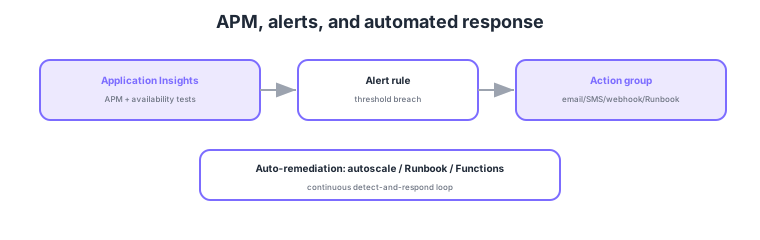
- Application Insights: track app response time/dependencies/exceptions/usage (APM).
- Availability tests: outside-in monitoring of endpoints to detect downtime fast.
- Alerts + action groups: trigger notifications or automated actions on threshold breach.
- Automated response: connect to autoscale or Runbook/Functions for auto-remediation.
Common on AZ-400: app APM = Application Insights, outside-in = availability tests, threshold notification/response = alerts + action groups, auto-remediation = Runbook/Functions/autoscale. Beyond detection, connect to notification and automated response via action groups.
AZ-400 APM/alert design probes "reliably connecting measurement to detection and response." Application Insights tracks app response time, dependencies (external DB/API calls), exceptions, request rate, and usage, visualizes dependency health via the application map, monitors in real time with live metrics, and periodically tests endpoints from outside (outside-in) with availability tests. Note that the only type to create today is the Standard test: URL ping tests retire on 30 September 2026 (existing ones are removed), and custom tests via TrackAvailability() have moved to archived Classic API guidance. Alert rules fire on metrics (static threshold / dynamic = anomaly detection), logs (KQL queries), and availability, and trigger via action groups notifications (email/SMS/push/voice) and automated actions (webhook/Logic Apps/Automation Runbook/Azure Functions/ITSM). Alert processing rules control suppression during maintenance and routing, and M-of-N evaluation / dynamic thresholds reduce false alarms. For automated response, use autoscale for load, Runbook/Functions for config drift or routine recovery, and Teams integration or incident management for major incidents. Crucially, don’t "stop at detection"—tie each alert to a runbook (who fixes what, how) to lower MTTR. The key is to measure APM + availability with Application Insights and reliably connect to notification and auto-remediation via alerts + action groups.
| Feature | Role | Key point |
|---|---|---|
| Application Insights | App APM | Response/deps/exceptions; app map; live metrics |
| Availability tests | Outside-in monitoring | Periodically test endpoints |
| Alert rules | Fire on threshold/log/availability | Static/dynamic thresholds; M-of-N |
| Action groups | Notify + automate | Email/SMS; Runbook/Functions/Logic Apps |
Scenario: When a production web app’s 5xx error rate spikes, notify the on-call immediately and attempt auto-recovery if possible. → Measure error rate/exceptions with Application Insights and set a dynamic-threshold alert rule (suppress false alarms). On firing, an action group notifies the on-call (Teams/SMS) while an Automation Runbook/Functions runs routine recovery (restart instances, clear cache). For load-driven cases, autoscale responds. Monitor availability with availability tests (outside-in).
FAQ: Availability tests vs Application Insights APM? Availability tests send periodic requests to endpoints from outside (outside-in), detecting downtime/latency even with no real users (good for SLA monitoring). APM (Application Insights core) measures in-app response/dependencies/exceptions (inside-out), capturing real experience and internal bottlenecks. They are complementary.
Exam trap: Creating an alert without associating an action group means no notification or automated response happens (detection only). Design alert = condition + action group = notify/automate together. To reduce false alarms, dynamic thresholds or M-of-N beat fixed thresholds. Handling in-app performance issues with availability tests alone is insufficient (APM is needed).
5.2.2Section summary
- APM = Application Insights + availability tests
- Response = alerts + action groups → auto-remediation
Sign in to track progress — Log in.
Quick check
(just a quick review)Q1. Track a web app’s response times, dependencies, and exceptions to find performance issues. What?
Q2. Periodically monitor whether key endpoints respond correctly from outside. What?
Q3. When an alert fires, notify by email and also trigger an auto-remediation Runbook. What?
Keep track of your progress
The full study guide is free to read. Sign up free to practice with the question bank, track what you have read, review your mistakes, and highlight passages.