

What's changed: Deepened AZ-305 Chapter 3 (added comparison tables, scenarios, FAQs, exam traps, deep-dive paragraphs to each section; localized figures to Japanese)
3.2Designing High Availability
Understand availability design—availability zones/availability sets, load balancing, zone-redundant services, and SLAs. Eliminate single points of failure and meet required availability.
High availability comes from redundancy. Spread across availability zones and use load balancing and zone-redundant services to remove single points of failure.
3.2.1Means of high availability
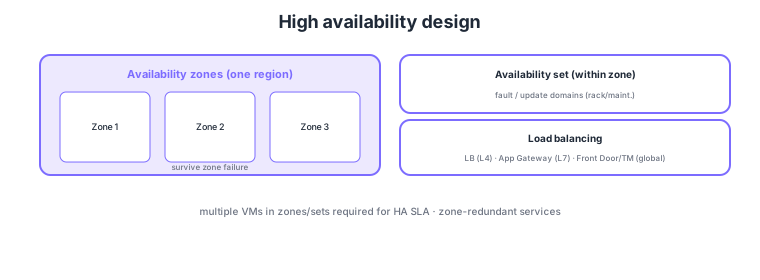
- Availability zones: spread across physically separate DCs in a region to survive zone failures.
- Availability sets: spread across fault/update domains within a zone (rack/maintenance failures).
- Load balancing: Load Balancer (L4) / Application Gateway (L7) / Front Door·Traffic Manager (global).
- Zone-redundant services/SLA: make managed services zone-redundant to meet SLA requirements.
Common on AZ-305: survive zone failure = availability zones, rack/maintenance within a zone = availability sets, L4 = Load Balancer, L7 = Application Gateway, global = Front Door/Traffic Manager. Without placing multiple VMs in zones or sets, you only get the single-VM SLA.
Application Gateway is L7 (WAF-capable), Front Door is global L7 + CDN/WAF, and Traffic Manager is DNS-based global routing.
AZ-305 availability design probes "which redundancy and load balancing meet the target SLA." Availability zones are physically independent DC groups within a region (separate power/cooling/network); spreading VMs or zone-redundant services across zones survives a zone (DC) failure. Availability sets spread within a single datacenter across fault domains (FD = power/rack units) and update domains (UD = sequential maintenance units), guarding against rack failures and planned maintenance—they cover a different failure domain, and are insufficient for a zone failure. Choose load balancing by OSI layer and scope: Load Balancer (L4, in-region TCP/UDP), Application Gateway (L7, path-based/WAF/SSL offload), Front Door (global L7 + CDN + WAF + fast failover), and Traffic Manager (DNS-based global routing: priority/weighted/geographic/performance). SLAs reach high values only with redundancy (a single VM is limited; zone spread or multiple instances improve it), using each service’s zone-redundant options (zone-redundant Application Gateway v2, zone-spread VMSS, zone-redundant SQL). The key is to clarify the failure domain to protect (node/rack/zone/region) and pair the matching redundancy with the right-layer load balancing.
| Load balancer | Layer/scope | Use |
|---|---|---|
| Load Balancer | L4, in-region | Distribute TCP/UDP |
| Application Gateway | L7, in-region | Path-based/WAF/SSL offload |
| Front Door | L7, global | CDN/WAF + fast failover |
| Traffic Manager | DNS, global | Priority/weight/geo/perf routing |
Scenario: Make a web app keep running even if one DC (zone) fails, with HTTP path-based routing and WAF. → Spread VMs/VMSS across multiple availability zones to survive a zone failure, and front it with a zone-redundant Application Gateway v2 (WAF enabled) for L7 routing. To extend across regions, add Front Door (global L7 + fast failover) at the very front.
FAQ: Availability zones or availability sets? To survive a zone (whole-DC) failure, use availability zones (spread across zones)—the default when the service supports zones. Availability sets are the older construct guarding against rack failures and planned maintenance within a single datacenter. For higher SLA and zone-failure resilience, choose availability zones.
Exam trap: Trying to satisfy a "survive a zone failure" requirement with availability sets alone is wrong. Availability sets spread fault/update domains within a single DC; a zone (whole-DC) failure needs availability zones. Also, a single VM cannot achieve a high SLA—it improves only when multiple instances are placed across zones/sets.
3.2.2Section summary
- Redundancy = availability zones (zone failure) / availability sets (rack)
- Distribution = LB (L4)/App Gateway (L7)/Front Door·Traffic Manager (global)
Sign in to track progress — Log in.
Quick check
(just a quick review)Q1. You want service to continue even if one datacenter (zone) fails. How do you place VMs?
Q2. You want L7 (HTTP/HTTPS) load balancing with path-based routing and WAF. What?
Q3. You want global optimal routing and fast delivery to endpoints in multiple regions. What?
Keep track of your progress
The full study guide is free to read. Sign up free to practice with the question bank, track what you have read, review your mistakes, and highlight passages.