

What's changed: Deepened AZ-305 Chapter 1 (added comparison tables, scenarios, FAQs, exam traps, deep-dive paragraphs to each section; localized figures to Japanese)
1.1Designing Identity and Access
Understand designing authentication/authorization on Azure—Microsoft Entra ID, RBAC, Conditional Access, managed identities, PIM, and B2B/B2C. Design a secure identity foundation with least privilege.
The foundation of architecture is identity. Centered on Microsoft Entra ID, design who can access what with least privilege.
1.1.1Identity and access building blocks
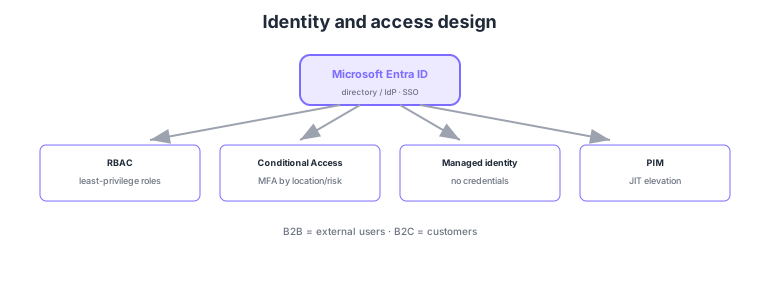
- Microsoft Entra ID: the cloud directory/identity provider; the hub for SSO and app integration.
- RBAC: grant least privilege via roles (scopes: management group/subscription/RG/resource).
- Conditional Access: apply policies like requiring MFA by location/device/risk.
- Managed identity: apps access Azure resources without credentials; PIM gives just-in-time elevation of privileges.
Common on AZ-305: least-privilege roles = RBAC, conditional MFA = Conditional Access, credential-free service access = managed identity, time-bound privilege elevation = PIM, external users = B2B, customers = B2C. Prefer managed identities for service-to-service access.
Managed identities come in "system-assigned" (same lifecycle as the resource) and "user-assigned" (shared across resources).
AZ-305 tests designing the right identity solution from requirements. Microsoft Entra ID is the cloud directory, connected to on-prem AD via Entra Connect (sync) or federation for hybrid identity. RBAC assigns roles with inheritance across management group → subscription → RG → resource scopes, using built-in roles (Owner/Contributor/Reader and service-specific) or custom roles for separation of duty. Conditional Access evaluates sign-in signals (user/location/device compliance/sign-in risk) and applies controls—require MFA, block, require a compliant device—as policies (risk-based ties into Entra ID Protection). Service-to-service auth defaults to managed identities, choosing system-assigned (1:1 with a resource, auto-deleted) vs user-assigned (shared across resources, independent lifecycle) by requirement. Make privileges just-in-time via PIM (approval, expiry, MFA on activation, access reviews), avoiding standing access. For external identity, pick B2B (External ID) to invite partners’ existing identities or B2C for customizable consumer-facing identity. Designs enforce "least privilege for people and services," "no held credentials," and "time-bound privilege."
| Requirement | Design choice | Key point |
|---|---|---|
| Service accesses resources securely | Managed identity | No credentials; system/user-assigned |
| Conditional auth hardening | Conditional Access | MFA/block by location/device/risk |
| Minimize privilege | PIM | JIT elevation; approval/expiry/review |
| External/customer identity | B2B / B2C | B2B = invite partners; B2C = consumers |
Scenario: An app on App Service accesses Key Vault secrets and Storage data, with zero credentials in code. → Enable a system-assigned managed identity on App Service and grant that identity RBAC (least-privilege roles) on Key Vault and Storage. The app obtains tokens and accesses without credentials. Admins elevate privileged work only when needed via PIM.
FAQ: System-assigned or user-assigned managed identity? If 1:1 with a resource and it’s fine for the identity to be deleted with the resource, use system-assigned (simpler). If you want the same identity shared across multiple resources, or the identity to outlive the resource, use user-assigned (independent lifecycle).
Exam trap: Designing "app registration + client secret" for service-to-service access is inappropriate where managed identities are available (secret management/rotation burden and leak risk). For workloads running on Azure resources, managed identity is the first choice. Also don’t conflate Conditional Access ("conditional control at authentication") with authorization (RBAC).
1.1.2Section summary
- Identity = Entra ID + RBAC (least privilege) + Conditional Access
- Service authz = managed identity / privileges = PIM
Sign in to track progress — Log in.
Quick check
(just a quick review)Q1. You want an app to access Key Vault/Storage securely without credentials in code. What?
Q2. You want to require MFA only for certain locations or risky sign-ins. What do you design?
Q3. You want admin privileged roles granted just-in-time with approval/expiry, not standing. What?
Keep track of your progress
The full study guide is free to read. Sign up free to practice with the question bank, track what you have read, review your mistakes, and highlight passages.