

What's changed: Deepened ANS-C01 Chapter 3 (Traffic Flow/health-check types, two edge function types/cache key, GA internals/dial + tables, scenarios, FAQ, traps; ja figures)
3.1Route 53 and Routing Policies
Route smartly with DNS—understand Route 53, latency/geolocation/weighted/failover routing, health checks, and alias records. Pick the policy that fits the goal.
Route 53 is AWS’s DNS service. Beyond resolving names to IPs, it can route traffic intelligently via routing policies.
3.1.1Key routing policies
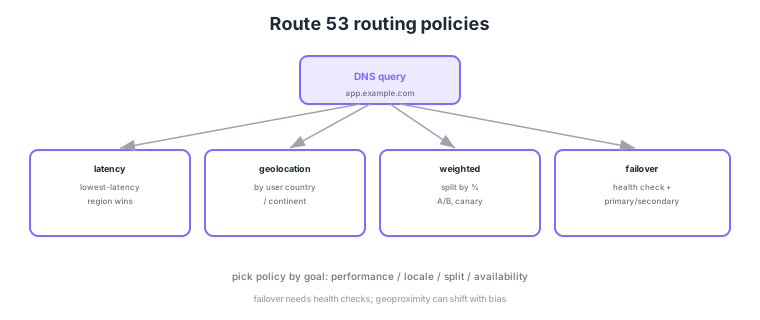
- Latency routing: send users to the lowest-latency region (performance).
- Geolocation routing: respond by user country/continent (compliance/localization).
- Weighted routing: split by percentage. Use for A/B tests and canary rollouts.
- Failover routing: switch to secondary on primary failure via health checks (availability).
Common on ANS-C01: nearest region for performance = latency, split by country/region = geolocation, percentage split/canary = weighted, and switch on failure = failover (requires health checks). Failover depends on health checks.
Use an "alias record" to point at AWS resources like an ALB or CloudFront. Aliases have no extra charge and track IP changes automatically.
ANS-C01 tests combining multiple policies and the kinds of health checks. Policies can nest: each weighted target can have its own failover, bundled under a top-level latency policy—a multi-tier design enabled by Traffic Flow (an alias pointing to another record set). Health checks come in three kinds: endpoint monitoring (probes an endpoint directly), calculated health checks (logical combination of other checks), and CloudWatch-metric checks (driven by a CloudWatch alarm); private targets unreachable from the public probes use calculated or CloudWatch-metric checks instead. Geoproximity adjusts the pull radius with a bias added to the distance from a region—distinct from Geolocation, which matches by country/continent. Because DNS is cached for the TTL, effective failover time depends on the TTL.
| Policy | Decision basis | Primary use |
|---|---|---|
| Latency | Measured network latency | Performance-first multi-region |
| Geolocation | User country/continent match | Compliance, localization, geo-fencing |
| Geoproximity | Distance from region + bias | Tune the traffic pull radius |
| Weighted | Configured percentages | A/B, canary, gradual migration |
| Failover | Health check healthy/unhealthy | Active/standby availability |
Scenario: active/active APIs in Tokyo and the US—send each user to the fastest region, and on a regional outage steer to the survivor automatically. → Set latency records with health checks on each regional endpoint. An unhealthy latency record drops out of the answer set, so latency + health checks alone yields active/active failover (no explicit failover policy needed).
FAQ: Q. Geolocation vs geoproximity? A. Geolocation is a discrete match on which country/continent the user is in. Geoproximity treats distance-from-region as a continuous quantity and widens/narrows each region’s coverage via bias. Q. Failover not switching? A. A long TTL keeps resolver caches alive and delays the switch; shorten the TTL for records that must fail over fast.
Trap: "simple routing can fail over with health checks" is false. Multivalue answer routing can omit unhealthy values from responses, but that differs from a failover policy—it is only client-side selection among multiple IPs for modest availability. When explicit primary/secondary switching is required, use failover routing.
3.1.2Section summary
- Policy = choose latency/geolocation/weighted/failover by goal
- Point to AWS resources via alias records; switching needs health checks
Sign in to track progress — Log in.
Quick check
(just a quick review)Q1. Direct global users via DNS to the region that responds fastest for each. Which policy?
Q2. Send only 10% of traffic to a new version for a gradual rollout. Which policy?
Q3. Auto-switch to a secondary when the primary becomes unhealthy. What is required?
Keep track of your progress
The full study guide is free to read. Sign up free to practice with the question bank, track what you have read, review your mistakes, and highlight passages.