

What's changed: Deepened SOA-C02 Chapter 3 to Associate depth (tables, scenarios, FAQ, traps; localized figures)
3.1Provisioning with CloudFormation
Understand IaC operations: CloudFormation templates and stacks, previewing with change sets, rolling out across accounts/regions with StackSets, and drift detection.
In operations, recreating the same environment quickly and repeatably matters. CloudFormation manages a group of resources (a stack) via declarative templates.
3.1.1Templates, stacks, and StackSets
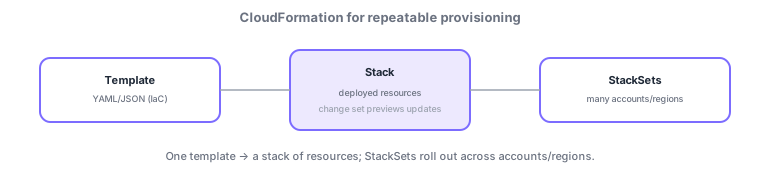
- Template/stack: create/update/delete a group of resources (a stack) from a declarative template.
- Change set: preview what will change on update to prevent surprises.
- StackSets: roll out the same stack across multiple accounts/regions.
- Drift detection: detect when the live environment has drifted from the template.
Common on SOA: preview updates = change sets, roll out across accounts/regions = StackSets, difference between manual changes and template = drift detection.
Operationally, use CloudFormation as a tool to "change safely / fan out / detect drift." On update, a change set previews "create/update/Replace/delete." Some attribute changes force a resource replacement that can lose IDs or data, so reading whether a replacement happens is crucial. Protect critical resources with a DeletionPolicy (Retain/Snapshot) or a stack policy to prevent accidental update/deletion. To distribute identical config across accounts/regions, use StackSets (service-managed auto-deploys via Organizations; self-managed uses your own roles). Find manual divergence via drift detection and reconcile back into the template. A failed update auto-rolls back by default; trace causes via stack states like DELETE_FAILED and CloudTrail/events. Reuse templates with nested stacks and share outputs with cross-stack references (Export/ImportValue).
| Goal | Use |
|---|---|
| Preview diffs (incl. replacement) | Change set |
| Deploy across accounts/regions | StackSets |
| Detect manual divergence | Drift detection |
| Protect critical resources | DeletionPolicy / stack policy |
Scenario: update a stack containing a production DB. First use a change set to confirm the DB isn’t Replaced (replacement = data loss). Set DeletionPolicy: Snapshot on the DB as a safety net and restrict its updates with a stack policy. To distribute the same config to all regions, use StackSets. If there were manual changes, surface them with drift detection and reconcile into the template.
Q. See what an update changes? Change set (watch for replacement). Q. Deploy to many accounts? StackSets. Q. Detect manual changes? Drift detection. Q. On failed update? Auto-rollback by default. Q. Protect critical resources? DeletionPolicy / stack policy.
Watch the mix-ups: (1) Some updates trigger resource replacement losing IDs/data—always check the change set. (2) Fixing drift outside the template risks being overwritten/destroyed on the next update. (3) Service-managed StackSets require Organizations. (4) Manual actions during auto-rollback can leave a stack in UPDATE_ROLLBACK_FAILED.
A failed stack update rolls back automatically by default. Avoid manual changes (drift); always make changes through the template.
3.1.2Section summary
- Template → stack; preview updates with change sets
- Use StackSets (fan-out) / drift detection
Sign in to track progress — Log in.
Quick check
(just a quick review)Q1. You want to preview which resources change before updating a CloudFormation stack. What do you use?
Q2. You want to deploy the same stack across multiple accounts and regions at once. What do you use?
Q3. Someone changed a resource manually; you want to detect divergence from the template. What do you use?