

What's changed: Deepened SCS-C02 Chapter 4 (added comparison tables, scenarios, FAQs, exam traps, deep-dive paragraphs to each section; localized figures to Japanese)
4.3Achieving Least Privilege and Auditing
Understand minimizing permissions—IAM Access Analyzer, Access Advisor (last-accessed), policy validation, temporary roles, and root user protection. Continually trim excess permissions.
Keep permissions minimal over time. Detect unused permissions, analyze external exposure, and protect the root user.
4.3.1Least privilege and auditing
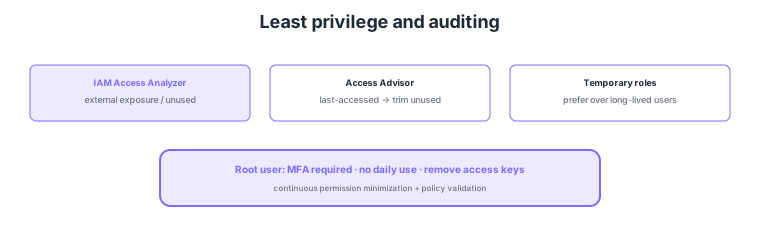
- IAM Access Analyzer: detect external exposure and unused access to support least privilege.
- Access Advisor: use last-accessed info to identify and trim unused permissions.
- Temporary roles: prefer temporary roles over long-lived users for people, reducing attack surface.
- Root user protection: strictly protect via MFA required, no daily use, remove access keys.
Common on SCS-C02: detect external exposure/unused access = IAM Access Analyzer, identify unused permissions = Access Advisor (last-accessed), people use temporary roles (cut long-lived keys), root = MFA + no daily use + remove keys. Never create (or remove) root access keys.
SCS-C02 least privilege probes operating to "continuously detect and trim excess permissions and strictly protect privilege." IAM Access Analyzer (1) detects whether S3/roles/KMS/Secrets/SQS are exposed outside the account/organization via the external access analyzer, (2) surfaces roles/permissions/access keys unused for a period via the unused access analyzer, (3) flags syntax/security issues via policy validation (IAM policy checks), and (4) generates a least-privilege policy from actual usage via policy generation from CloudTrail. Access Advisor (last-accessed info) shows when a role/user last accessed each service, used to trim unused permissions. Operationally, minimize long-lived IAM users for people, using temporary roles via Identity Center/federation, and assign roles (temporary credentials) to services. The root user is the most powerful, so require MFA (ideally hardware), never use for daily ops, do not create / remove access keys, and limit it to contact and billing; in an org, consider restricting dangerous root actions via SCP. Additionally, tag-based access control (ABAC) manages permissions scalably. The key is to continuously trim excess permissions with Access Analyzer/Access Advisor, default to temporary credentials, and strictly protect root.
| Goal | Means | Key point |
|---|---|---|
| Detect external exposure | IAM Access Analyzer (external) | Unintended exposure of S3/roles/KMS |
| Trim unused permissions | Unused access / Access Advisor | Identify via last-accessed |
| Generate least-priv policy | Access Analyzer (from CloudTrail) | Generate from actual usage |
| Protect privilege | Root protection + temporary roles | MFA/remove keys; fewer long-lived users |
Scenario: In a long-running account, inventory over-granted permissions and externally exposed resources to approach least privilege. → Use IAM Access Analyzer external analysis to detect and fix unintended external exposure (S3/roles/KMS); use unused access analysis and Access Advisor last-accessed info to identify and remove unused permissions/stale access keys. Rebuild least-privilege policies via policy generation from actual usage, migrate people to temporary roles in Identity Center, and protect root with MFA + removed access keys.
FAQ: IAM Access Analyzer vs Access Advisor? Access Analyzer analyzes whether resources are externally exposed and whether access is unused, and also validates/generates policies. Access Advisor (last-accessed info) shows when a specific role/user last accessed each service, used to trim unused permissions. The former finds exposure/unused access and validates; the latter confirms permission usage history.
Exam trap: Issuing root access keys for automation is a serious anti-pattern—root must require MFA, never have access keys (remove them), and not be used daily; use IAM roles for automation. Also, keeping broad *:* permissions while claiming "least privilege" is wrong—continuously trim with Access Advisor/Access Analyzer.
4.3.2Section summary
- Minimize = Access Analyzer + Access Advisor + temporary roles
- Protect = root user (MFA/no daily use/remove keys)
Sign in to track progress — Log in.
Quick check
(just a quick review)Q1. Continuously detect if S3 buckets or roles are unintentionally externally exposed. What?
Q2. Identify and trim permissions an IAM role/user does not actually use. What do you check?
Q3. Which is the most appropriate protection for the root user?
Keep track of your progress
The full study guide is free to read. Sign up free to practice with the question bank, track what you have read, review your mistakes, and highlight passages.