

What's changed: Added figure aws-genai-security (OWASP LLM risks → AWS mitigations) to the gen-AI security section s4. The cloned base chapters inherit SCS-C02 figures; s4 was the only section lacking one, now filled.
3.3Protecting Compute and Endpoints
Understand compute defense—Systems Manager (patch/Session Manager), hardening/golden AMIs, Inspector, bastion-less (SSM), and EC2 metadata (IMDSv2). Keep instances secure.
Protect compute via patching, hardening, and secure access. Avoid open SSH; access via SSM.
3.3.1Compute protection
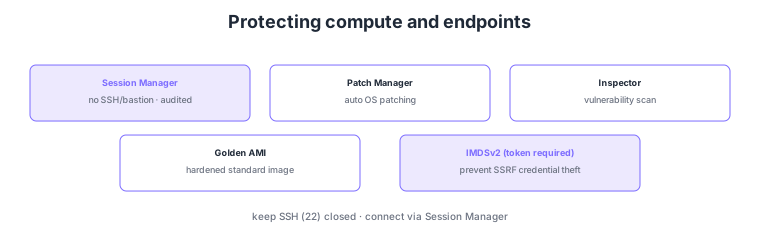
- Patch Manager: auto-apply OS patches to reduce vulnerabilities.
- Session Manager: connect securely without SSH/bastion; no open ports, operations audited.
- Hardening/golden AMI: distribute standardized hardened images.
- IMDSv2: require tokens for instance metadata to prevent SSRF-based credential theft.
Common on SCS-C02: secure bastion-less access = Session Manager, auto-patching = Patch Manager, metadata protection = enforce IMDSv2, vulnerability scanning = Inspector. The recommended pattern is to keep SSH (port 22) closed and connect via Session Manager.
SCS-C02 compute defense probes "reducing attack surface and keeping access and credentials safe." Systems Manager Session Manager opens no SSH/RDP ports and needs no bastion: IAM-authorized users get a shell via browser/CLI, with sessions recorded to CloudTrail/CloudWatch Logs/S3 for audit (no key management; port 22 can stay closed). Patch Manager auto-applies OS/app patches via patch baselines and maintenance windows, and Inspector continuously scans EC2/ECR/Lambda for CVEs, surfacing unpatched vulnerabilities. Distribute images as golden AMIs (hardened to CIS benchmarks, unneeded services off, pipelined with EC2 Image Builder). IMDSv2 requires a session token (PUT→GET) for instance-metadata access and can set a hop limit, preventing the classic attack where SSRF steals the instance role’s temporary credentials (enforce IMDSv2, disable IMDSv1). Pass credentials via an instance role, never placing long-lived keys on instances. The key is to go bastion-less and close ports with Session Manager, manage vulnerabilities with Patch Manager/Inspector, harden via golden AMIs, and protect metadata by enforcing IMDSv2.
| Goal | Means | Key point |
|---|---|---|
| Secure access | Session Manager | No SSH/bastion; ports closed; audited |
| Reduce vulnerabilities | Patch Manager / Inspector | Auto-patch + continuous scan |
| Hardened standard image | Golden AMI | CIS hardening; Image Builder |
| Metadata protection | Enforce IMDSv2 | Token required; prevent SSRF theft |
Scenario: Operators must connect securely to EC2 in private subnets with no SSH ports open, and you must also prevent SSRF from stealing the instance role’s credentials. → Connect bastion-less via Session Manager (SSM agent + IAM authz), keep port 22 closed, and record operations to CloudWatch Logs/S3. Enforce IMDSv2 on instances (disable IMDSv1, set hop limit) to prevent metadata theft, auto-apply patches with Patch Manager, and monitor vulnerabilities with Inspector.
FAQ: Why enforce IMDSv2? IMDSv1 returns metadata (including the instance role’s temporary credentials) on a simple request, so an app SSRF vulnerability lets an attacker steal credentials. IMDSv2 requires obtaining a session token via PUT before any GET and supports a hop limit, making SSRF-based theft far harder. Disable IMDSv1 and require IMDSv2.
Exam trap: Designing operational access by opening SSH ports on a bastion increases attack surface and is not recommended—Session Manager needs no open ports or bastion and provides audit. Also, placing long-lived access keys on instances is wrong—use an instance role (temporary credentials) and enforce IMDSv2 to prevent theft.
3.3.2Section summary
- Protection = Patch Manager + golden AMI + Inspector
- Secure access = Session Manager (bastion-less) / metadata = IMDSv2
Sign in to track progress — Log in.
Quick check
(just a quick review)Q1. Connect to EC2 securely without opening SSH or running a bastion. What?
Q2. Prevent SSRF from stealing temporary credentials via instance metadata. What do you enforce?
Q3. Continuously auto-apply OS patches across many EC2. What?
Keep track of your progress
The full study guide is free to read. Sign up free to practice with the question bank, track what you have read, review your mistakes, and highlight passages.