

What's changed: Deepened SCS-C02 Chapter 1 (added comparison tables, scenarios, FAQs, exam traps, deep-dive paragraphs to each section; localized figures to Japanese)
1.3Incident Response Preparation and Forensics
Understand IR readiness—playbooks/runbooks, forensics (snapshots/isolation), CloudTrail trails, compromised-credential response, and least-privilege IR roles. Prepare in advance to respond fast and reliably.
IR success hinges on preparation. Prepare playbooks and forensics (evidence-preservation) procedures.
1.3.1IR and forensics
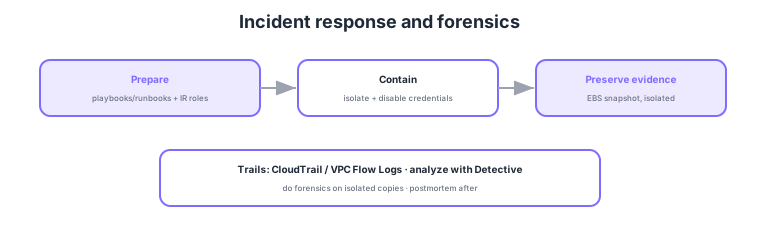
- Playbooks/runbooks: predefine and automate response steps with SSM Automation.
- Forensics: preserve evidence with EBS snapshots and analyze in an isolated environment.
- Trails: secure who/what/where via CloudTrail / VPC Flow Logs.
- Least-privilege IR roles: pre-grant responders just-enough permissions to act fast.
Common on SCS-C02: automate response steps = SSM Automation runbooks, preserve evidence = EBS snapshots + analyze in an isolated env, trails = CloudTrail/VPC Flow Logs, preparation = IR roles/playbooks. Do forensics on isolated copies to avoid impacting production.
SCS-C02 incident response probes "preparation and the correct order of evidence preservation." For preparation, codify response steps in SSM Automation runbooks or Step Functions, prepare least-privilege IR roles (a dedicated forensics account/role in advance), and ensure logs are pre-enabled and preserved (CloudTrail organization trail to a dedicated log-archive account, S3 Object Lock for tamper-proofing, VPC flow logs, GuardDuty always on). The incident rule follows the NIST flow (prepare → detect/analyze → contain → eradicate → recover → lessons learned), especially "don’t lose evidence around containment (isolation)." For EC2: (1) capture volatile memory first, then (2) preserve disk via EBS snapshots, (3) network-isolate by swapping to a deny-all SG or a quarantine VPC, and (4) stop/tag rather than terminate the instance to preserve it; analyze on an isolated copy in a separate environment to avoid contaminating production and evidence. If credentials are involved, disable and rotate in parallel. Secure trails with CloudTrail (who called which API) / VPC flow logs (traffic) / Detective (timeline), and after, run a blameless postmortem to learn root cause and prevention (more automation, stronger guardrails). The key is to prepare log preservation and IR roles/runbooks in advance and perform forensics in the correct order—preserve evidence before isolation.
| IR phase | Action | Key point |
|---|---|---|
| Prepare | Runbooks; IR roles; log preservation | Org trail; GuardDuty always on |
| Contain | Isolate (SG/VPC) | Stop not terminate; cut comms |
| Preserve evidence | Memory → EBS snapshot | Volatile first; analyze on isolated copy |
| Trails/investigate | CloudTrail/VPC logs/Detective | Who/traffic/timeline |
Scenario: An EC2 is suspected compromised, and you also need root-cause analysis. First actions? → (1) Prioritize evidence preservation (capture volatile memory → EBS snapshot), (2) network-isolate (swap to a deny-all SG or quarantine VPC, detach from ASG), (3) stop/tag the instance (do not terminate), (4) analyze on an isolated copy. In parallel, disable and rotate the instance role’s credentials. Secure trails with CloudTrail/VPC flow logs and follow the timeline in Detective. Avoid immediate terminate/reboot, which destroys evidence.
FAQ: Why do forensics on an isolated copy? Analyzing directly on the production instance (1) alters/contaminates evidence through the analysis itself, (2) risks tipping off the attacker to destroy evidence, and (3) impacts production. The correct approach is to attach a volume cloned from the EBS snapshot to an isolated, dedicated forensics account/environment for analysis, keeping the original (snapshot) intact for integrity.
Exam trap: "Terminating and rebuilding" a compromised instance immediately is wrong for IR/forensics—it loses memory/disk evidence, obscuring root cause. The correct order is isolate → preserve evidence → analyze. Also, enabling logs after the incident cannot recover past events, so CloudTrail/VPC flow logs/GuardDuty must be enabled always, in advance.
1.3.2Section summary
- Prep = playbooks/runbooks (SSM Automation) + IR roles
- Preserve = EBS snapshots + CloudTrail/VPC Flow Logs
Sign in to track progress — Log in.
Quick check
(just a quick review)Q1. During an incident, preserve a compromised instance’s disk as evidence. What first?
Q2. Auto-run standard IR steps (isolate/snapshot/disable). What?
Q3. Secure who/when/which API was called for incident investigation. What?
Keep track of your progress
The full study guide is free to read. Sign up free to practice with the question bank, track what you have read, review your mistakes, and highlight passages.