

What's changed: Deepened SCS-C02 Chapter 3 (added comparison tables, scenarios, FAQs, exam traps, deep-dive paragraphs to each section; localized figures to Japanese)
3.3Protecting Compute and Endpoints
Understand compute defense—Systems Manager (patch/Session Manager), hardening/golden AMIs, Inspector, bastion-less (SSM), and EC2 metadata (IMDSv2). Keep instances secure.
Protect compute via patching, hardening, and secure access. Avoid open SSH; access via SSM.
3.3.1Compute protection
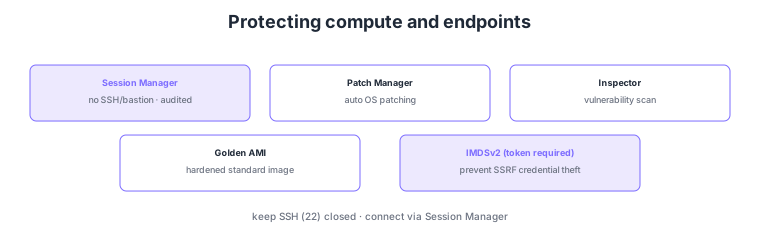
- Patch Manager: auto-apply OS patches to reduce vulnerabilities.
- Session Manager: connect securely without SSH/bastion; no open ports, operations audited.
- Hardening/golden AMI: distribute standardized hardened images.
- IMDSv2: require tokens for instance metadata to prevent SSRF-based credential theft.
Common on SCS-C02: secure bastion-less access = Session Manager, auto-patching = Patch Manager, metadata protection = enforce IMDSv2, vulnerability scanning = Inspector. The recommended pattern is to keep SSH (port 22) closed and connect via Session Manager.
SCS-C02 compute defense probes "reducing attack surface and keeping access and credentials safe." Systems Manager Session Manager opens no SSH/RDP ports and needs no bastion: IAM-authorized users get a shell via browser/CLI, with sessions recorded to CloudTrail/CloudWatch Logs/S3 for audit (no key management; port 22 can stay closed). Patch Manager auto-applies OS/app patches via patch baselines and maintenance windows, and Inspector continuously scans EC2/ECR/Lambda for CVEs, surfacing unpatched vulnerabilities. Distribute images as golden AMIs (hardened to CIS benchmarks, unneeded services off, pipelined with EC2 Image Builder). IMDSv2 requires a session token (PUT→GET) for instance-metadata access and can set a hop limit, preventing the classic attack where SSRF steals the instance role’s temporary credentials (enforce IMDSv2, disable IMDSv1). Pass credentials via an instance role, never placing long-lived keys on instances. The key is to go bastion-less and close ports with Session Manager, manage vulnerabilities with Patch Manager/Inspector, harden via golden AMIs, and protect metadata by enforcing IMDSv2.
| Goal | Means | Key point |
|---|---|---|
| Secure access | Session Manager | No SSH/bastion; ports closed; audited |
| Reduce vulnerabilities | Patch Manager / Inspector | Auto-patch + continuous scan |
| Hardened standard image | Golden AMI | CIS hardening; Image Builder |
| Metadata protection | Enforce IMDSv2 | Token required; prevent SSRF theft |
Scenario: Operators must connect securely to EC2 in private subnets with no SSH ports open, and you must also prevent SSRF from stealing the instance role’s credentials. → Connect bastion-less via Session Manager (SSM agent + IAM authz), keep port 22 closed, and record operations to CloudWatch Logs/S3. Enforce IMDSv2 on instances (disable IMDSv1, set hop limit) to prevent metadata theft, auto-apply patches with Patch Manager, and monitor vulnerabilities with Inspector.
FAQ: Why enforce IMDSv2? IMDSv1 returns metadata (including the instance role’s temporary credentials) on a simple request, so an app SSRF vulnerability lets an attacker steal credentials. IMDSv2 requires obtaining a session token via PUT before any GET and supports a hop limit, making SSRF-based theft far harder. Disable IMDSv1 and require IMDSv2.
Exam trap: Designing operational access by opening SSH ports on a bastion increases attack surface and is not recommended—Session Manager needs no open ports or bastion and provides audit. Also, placing long-lived access keys on instances is wrong—use an instance role (temporary credentials) and enforce IMDSv2 to prevent theft.
3.3.2Section summary
- Protection = Patch Manager + golden AMI + Inspector
- Secure access = Session Manager (bastion-less) / metadata = IMDSv2
Sign in to track progress — Log in.
Quick check
(just a quick review)Q1. Connect to EC2 securely without opening SSH or running a bastion. What?
Q2. Prevent SSRF from stealing temporary credentials via instance metadata. What do you enforce?
Q3. Continuously auto-apply OS patches across many EC2. What?