

What's changed: Added an awareness note on Microsoft Security Copilot (generative-AI security operations, Ignite 2025) to the Sentinel section, reflecting the AI-assist trend (no structural change to official skills measured).
3.2Microsoft Defender XDR
Understand the workloads of Microsoft Defender XDR, which detects and responds to threats across endpoints, email, identity, and SaaS apps.
Microsoft Defender XDR unifies protection across domains (endpoints, email, identity, apps) to detect and respond to threats holistically (XDR = Extended Detection and Response).
3.2.1Key workloads
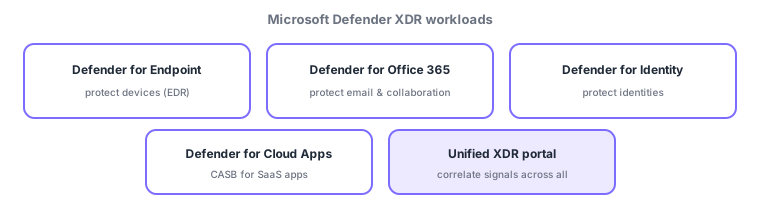
XDR (Extended Detection and Response) goes beyond per-domain detection (e.g., endpoint-only EDR) to correlate signals across domains and see an attack as one incident. For example, "phishing email (Office 365) → device malware (Endpoint) → credential abuse (Identity) → data exfiltration from SaaS (Cloud Apps)" is detected and handled as one connected case, not scattered alerts. Defender XDR unifies these in one portal.
- Defender for Endpoint: an EDR protecting devices like PCs and servers (detect/investigate/respond).
- Defender for Office 365: protects email and collaboration (Teams, etc.) from phishing and malware.
- Defender for Identity: detects attacks against identities (lateral movement, privilege escalation) in on-prem AD, etc.
- Defender for Cloud Apps: a CASB to monitor/control SaaS app usage (e.g., discover shadow IT).
| Protects | Product | Note |
|---|---|---|
| Devices | Defender for Endpoint | EDR |
| Email/collaboration | Defender for Office 365 | Anti-phishing |
| Identity | Defender for Identity | On-prem AD attack detection |
| SaaS apps | Defender for Cloud Apps | CASB, shadow IT |
Watch the mix-ups: (1) Choose by what is protected (device = Endpoint / email = Office 365 / identity = Identity / SaaS = Cloud Apps). (2) Defender XDR (cross-domain detection/response) vs the previous Defender for Cloud (cloud-resource posture)—similar names, different roles. (3) XDR correlates signals into one incident, unlike standalone EDR.
Q. EDR vs XDR? EDR is endpoint-focused detection/response; XDR correlates across domains (endpoint plus email, identity, apps). Q. What is a CASB? A mechanism to monitor/control SaaS app usage—Defender for Cloud Apps. Q. Defender for Identity vs Entra ID Protection? The former mainly detects attacks on on-prem AD; the latter (previous chapter) rates cloud sign-in risk—complementary.
Common mappings: devices = for Endpoint, email = for Office 365, identity = for Identity, SaaS apps = for Cloud Apps. Also: XDR correlates/unifies across domains—distinct from Defender for Cloud (posture).
3.2.2Section summary
- Defender XDR = unified detection/response across domains
- Endpoint (devices) / Office 365 (email) / Identity / Cloud Apps (SaaS)
Sign in to track progress — Log in.
Quick check
(just a quick review)Q1. Which Microsoft Defender product protects devices like PCs and servers?
Q2. Which Microsoft Defender product protects email and collaboration from phishing?
Q3. Which Microsoft Defender product is a CASB that monitors and controls SaaS app usage?
Keep track of your progress
The full study guide is free to read. Sign up free to practice with the question bank, track what you have read, review your mistakes, and highlight passages.