

What's changed: In-scope coverage: deployment/runtime/IaC services
3.2MLOps and SageMaker Pipelines
Understand MLOps: automating the ML lifecycle with SageMaker Pipelines, versioning/approval with the Model Registry, and CI/CD integration.
To continuously rebuild and deploy models, automate the ML lifecycle (MLOps). On AWS, SageMaker Pipelines is central.
3.2.1Pipelines and the Model Registry
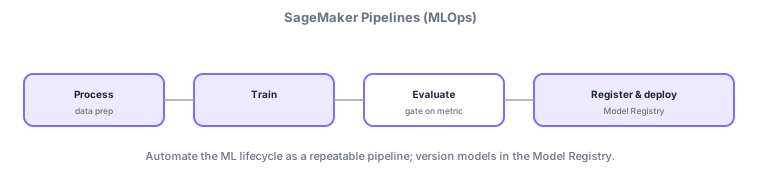
- SageMaker Pipelines: automate prep→train→evaluate→register/deploy as a repeatable pipeline.
- Model Registry: version models and gate production deployment via approval status.
- Evaluation step: proceed to register/deploy only if metrics pass a threshold (a quality gate).
- Integrate with CI/CD (e.g., CodePipeline) to automate retraining/deploy from a commit.
Common on MLA: automate the ML lifecycle = SageMaker Pipelines, version/approve models = Model Registry, gate before prod on metrics = evaluation step.
MLOps runs "the ML lifecycle reproducibly, automatically, and under governance." SageMaker Pipelines defines process→train→evaluate→register/deploy as a DAG, tracking each step’s inputs/outputs (data, model, metrics) via lineage. An evaluation step + ConditionStep creates a quality gate that "proceeds to registration only if metrics pass a threshold." Trained models are versioned into the Model Registry as a model package group, with approval status (Approved/Rejected) governing production deployment—approval triggers automated deploy via CI/CD like CodePipeline. Use SageMaker Experiments for experiment tracking, ML Lineage Tracking for metadata, and Projects for templated setups. Automate retraining triggered by EventBridge (schedule) or Model Monitor drift detection (data/model quality, feature attribution, bias drift) to keep models fresh. The axes: "lifecycle automation = Pipelines," "version/approval = Model Registry," "pre-prod gate = evaluation step."
| Goal | Use |
|---|---|
| Automate the lifecycle | SageMaker Pipelines |
| Version/approve models | Model Registry |
| Pre-prod quality gate | Evaluation step + condition |
| Retrain on drift | Model Monitor + EventBridge |
Scenario: never ship sub-threshold models, and auto-deploy after approval. Build train → evaluation step + condition (e.g., F1 ≥ 0.85) in SageMaker Pipelines, registering to the Model Registry only when it passes. When an owner marks it Approved, CodePipeline auto-deploys. In production, Model Monitor watches drift and EventBridge triggers retraining on detection.
Q. Automate lifecycle? SageMaker Pipelines. Q. Version/approve? Model Registry. Q. Pre-prod gate? Evaluation step + condition. Q. Detect drift? Model Monitor. Q. Trigger retraining? EventBridge (schedule/event).
Watch the mix-ups: (1) Pipelines = automation / Model Registry = version-approval—don’t swap. (2) Without a quality gate, bad models reach prod—always add an evaluation step + condition. (3) Model Monitor detects but doesn’t auto-fix—design retraining/rollback separately. (4) Skipping the approval flow loses governance.
Automate retraining triggered by schedules (EventBridge) or data/model drift detection to keep models fresh.
3.2.2Section summary
- SageMaker Pipelines (automation) + Model Registry (version/approval)
- Quality gate via evaluation step; integrate with CI/CD
Sign in to track progress — Log in.
Quick check
(just a quick review)Q1. You want to automate the prep→train→evaluate→deploy ML lifecycle reproducibly. Which fits best?
Q2. You want to version models and deploy only approved ones to production. What do you use?
Q3. What lets a pipeline "proceed to registration only if the evaluation metric passes a threshold"?
Keep track of your progress
The full study guide is free to read. Sign up free to practice with the question bank, track what you have read, review your mistakes, and highlight passages.