

What's changed: In-scope coverage: model dev/AI services
2.1Model Selection and Training
Understand three model-building approaches on SageMaker (built-in algorithms, script mode/bring-your-own container, AutoML/JumpStart) and training-job basics. The starting point for "ML Model Development" in MLA-C01.
Once data is ready, you select and train a model. SageMaker offers several approaches with different effort and flexibility.
2.1.1Build approaches
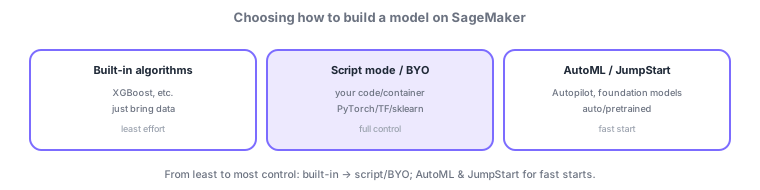
- Built-in algorithms: pass data to AWS-provided algorithms like XGBoost; least effort.
- Script mode / BYO container: train with your own code (PyTorch/TensorFlow/scikit-learn); most flexibility.
- AutoML (Autopilot) / JumpStart: auto-search the best model, or use pretrained/foundation models; fast start.
- Training jobs: run training by specifying instance type, data input, and hyperparameters.
Common on MLA: least effort, strong on tabular = built-in XGBoost, your own framework = script mode/BYO container, auto model search = Autopilot, pretrained/foundation models = JumpStart.
Choose a build approach by the "effort-vs-flexibility trade-off." Built-in algorithms (XGBoost, linear learner, k-means, etc.) just take data and are especially strong on tabular data with minimal effort. Script mode / BYO container trains with your own code (PyTorch/TensorFlow/scikit-learn) for maximum flexibility (good for migrating assets). AutoML (Autopilot) auto-searches models and hyperparameters; JumpStart quickly uses pretrained/foundation models. Training runs as a training job, specifying instance type, input (File/Pipe/FastFile input modes), and hyperparameters, with outputs saved as model artifacts in S3. Scale with distributed training (data/model parallel) and cut cost with managed spot training (up to ~90% off, with checkpoints for interruptions). Match the algorithm to the problem type (classification/regression/forecasting/recommendation/vision/NLP), and start from a strong baseline like XGBoost.
| Situation | Best approach |
|---|---|
| Tabular, least effort | Built-in (XGBoost, etc.) |
| Train with your own framework | Script mode / BYO container |
| Auto model search | AutoML (Autopilot) |
| Use pretrained/foundation models | JumpStart |
Scenario: quickly build a tabular churn-prediction model. Start with built-in XGBoost for a strong baseline (data in S3, a training job). Cut training cost with managed spot + checkpoints. If you need more accuracy, try custom features or another framework via script mode, or hand off the search to Autopilot.
Q. Tabular, least effort? Built-in XGBoost. Q. Own PyTorch code? Script mode / BYO container. Q. Auto model search? Autopilot. Q. Pretrained/foundation models? JumpStart. Q. Cut training cost? Managed spot + checkpoints.
Watch the mix-ups: (1) Autopilot = auto model search / JumpStart = pretrained/foundation models—don’t swap. (2) Managed spot can be interrupted—checkpoints are essential. (3) Built-in algorithms still have input-format (RecordIO/CSV) and hyperparameter requirements. (4) Full-loading huge data every time is slow—consider Pipe/FastFile modes.
For large training, distributed training and Spot (managed spot training) cut cost; use checkpoints to handle interruptions.
2.1.2Section summary
- Choose built-in / script·BYO / AutoML·JumpStart
- Cut cost with managed spot + checkpoints
Sign in to track progress — Log in.
Quick check
(just a quick review)Q1. You want a high-performing classification/regression model on tabular data with least effort. Which fits best?
Q2. You want to train your own PyTorch code on SageMaker. Which fits best?
Q3. You want to auto-search the best model and hyperparameters with little code. What do you use?
Keep track of your progress
The full study guide is free to read. Sign up free to practice with the question bank, track what you have read, review your mistakes, and highlight passages.