

What's changed: In-scope coverage: data prep/ingestion/storage/stores/extraction services
1.2SageMaker Data-Preparation Tools
Understand SageMaker Data Wrangler (visual prep), Feature Store (store/share features), and large-scale transforms with Processing jobs/Glue.
On AWS, Amazon SageMaker features streamline data prep. Choose among visual prep, feature reuse, and large-scale processing.
1.2.1Choosing prep tools
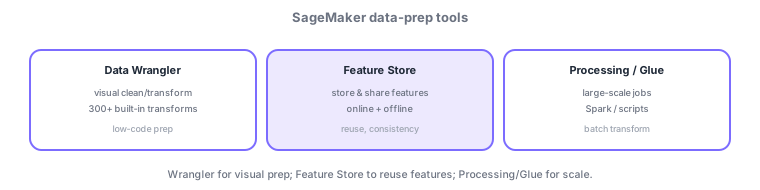
- Data Wrangler: visually clean/transform data (many built-in transforms); quick low-code prep.
- Feature Store: store/share/reuse features; online (low-latency inference) and offline (training) stores.
- Processing jobs / Glue: run large-scale batch transforms with Spark/scripts.
Common on MLA: visual/low-code prep = Data Wrangler, store/share/consistent features = Feature Store (online/offline), large-scale batch transform = Processing/Glue.
SageMaker data prep is chosen by scale and purpose. Data Wrangler visually cleans/transforms in SageMaker Studio (300+ built-in transforms, data-quality/bias insights) and exports flows directly to Processing jobs, pipelines, or Feature Store. Feature Store is the hub for reuse and consistency, with an online store for low-latency real-time inference and an offline store (S3) for training/batch, sharing the same feature definitions between training and inference to prevent training-serving skew. Large batch transforms suit Processing jobs (Spark/custom scripts/containers) or AWS Glue, integrating with the prior chapter’s ETL stack. Use Studio notebooks for ad-hoc exploration and embed steady ops in SageMaker Pipelines. The axes: "visual/low-code = Data Wrangler," "store/share/consistent features = Feature Store," "large batch = Processing/Glue." Combine with SageMaker Clarify (next section) for quality and bias.
| Goal | Use |
|---|---|
| Visual/low-code prep | Data Wrangler |
| Store/share/consistent features | Feature Store (online/offline) |
| Large-scale batch transform | Processing jobs / Glue |
| Low-latency inference features | Feature Store online store |
Scenario: multiple teams reuse the same customer features for both training and inference. Define features in Feature Store: training reads the offline store (S3), real-time inference reads the online store—sharing one definition prevents training-serving skew. Build the preprocessing flow in Data Wrangler, scale it out as a Processing job, and embed it in Pipelines for reproducibility.
Q. Visual data prep? Data Wrangler. Q. Share/consistent features? Feature Store. Q. Low-latency inference retrieval? Online store. Q. Training/batch? Offline store (S3). Q. Large-scale transform? Processing/Glue.
Watch the mix-ups: (1) Feature Store online = low-latency inference / offline = training/batch—don’t swap. (2) Data Wrangler is for prep (clean/transform), not a feature storage layer (that’s Feature Store). (3) Writing separate preprocessing for training vs. inference breeds skew—share the definition.
Feature Store shares the same feature definitions between training and inference, preventing training-serving skew.
1.2.2Section summary
- Data Wrangler (visual prep) / Feature Store (feature reuse) / Processing·Glue (scale)
- Feature Store prevents training-serving skew
Sign in to track progress — Log in.
Quick check
(just a quick review)Q1. You want visual, low-code data cleansing/transformation. Which SageMaker feature fits best?
Q2. You want to store/share features for consistency between training and inference. Which SageMaker feature fits best?
Q3. What is the main use of the Feature Store online store?
Keep track of your progress
The full study guide is free to read. Sign up free to practice with the question bank, track what you have read, review your mistakes, and highlight passages.