

What's changed: Initial version (topic 2.08, subtopics 2.08.1–2.08.3)
2.1Configuring and Managing BIND
Learn the layout of BIND's (named) core config file named.conf, and the query/operations tools dig, host, nslookup, rndc, and named-checkconf. Also cover where lightweight alternatives dnsmasq, Unbound, NSD, and PowerDNS fit in.
Name resolution underlies nearly every network service. BIND (Berkeley Internet Name Domain; the running process is named) is the most widely deployed DNS server, and L2 tests whether you can handle its configuration file structure and query/operations commands precisely.
2.1.1The structure of named.conf
- named.conf is BIND's core config. An
options { }block sets overall defaults (listen addresses, recursion, forwarding), followed by per-zone statements likezone "example.com" { type master; file "..."; };. - A zone's
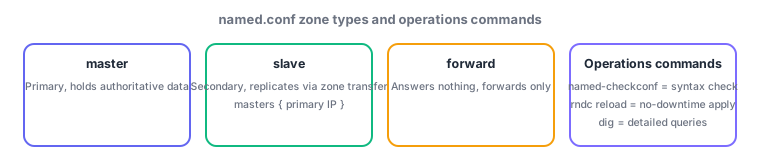
typeis chiefly master (primary; holds the authoritative data), slave (secondary; replicates from a master via a zone transfer), or forward (answers nothing itself, only forwards to specified servers). - Check syntax and typos with named-checkconf before starting the daemon—this habit prevents outages. Apply changes afterward with rndc reload and similar.
2.1.2Query and operations commands
- dig is the most detailed query tool.
dig @ns1.example.com www.example.com Alets you specify the server, name, and record type explicitly, showing the ANSWER and AUTHORITY sections—making it the primary troubleshooting tool. - host gives a quick resolution check (
host www.example.com). nslookup is the traditional tool supporting both interactive and non-interactive use. Both produce simpler output than dig. - rndc remotely controls a running named (
rndc reloadreloads config,rndc reload zonereloads just one zone,rndc flushclears the cache,rndc status). Its advantage is applying changes without stopping named.
The most common contrast: checking config errors = named-checkconf, reloading without downtime = rndc reload, detailed queries = dig. Also standard: the difference among zone type values master, slave, and forward (holds the authoritative copy vs. merely forwards).
A real scenario clarifies the roles. To stand up a new internal zone example.com as a master server, add zone "example.com" { type master; file "/var/named/example.com.zone"; }; to named.conf, verify no syntax errors with named-checkconf, then apply it to the running named with rndc reload. A secondary (slave) server uses the same zone name but type slave; masters { 192.0.2.1; };—specifying the master's IP address—and fetches data via a zone transfer on first startup. When queries fail to return, use dig to switch which server you are asking (the @ option), isolating whether the authoritative server returns correct records and whether recursive resolution through a caching server works. For small or embedded use, dnsmasq (lightweight DNS + DHCP) is common; Unbound suits a cache-only recursive resolver; NSD is a fast, simple authoritative-only implementation; and PowerDNS excels when backed by a database—so implementations other than BIND get chosen depending on requirements.
| Tool / setting | Role | Example |
|---|---|---|
| named.conf zone type | master = primary, slave = secondary, forward = forward-only | type master; / type slave; |
| named-checkconf | Syntax error checking | named-checkconf /etc/named.conf |
| rndc | Control a running named without downtime | rndc reload / rndc flush |
| dig | Detailed query and troubleshooting | dig @ns1 www.example.com A |
Trap: "the only way to apply config changes is restarting named" is wrong—rndc reload reloads without downtime (a restart is needed only for certain special changes). Also, "zone type forward holds the authoritative copy" is wrong—master holds the authoritative copy; forward answers nothing itself and only forwards to specified servers.
2.1.3Section summary
- named.conf zone type = master (primary) / slave (secondary; replicates via zone transfer) / forward (forward-only)
- named-checkconf = syntax check / rndc = operate without downtime / dig = detailed queries. Lightweight alternatives: dnsmasq, Unbound, NSD, PowerDNS
Sign in to track progress — Log in.
Quick check
(just a quick review)Q1. Before starting named, you want to verify the new zone's named.conf has no syntax errors. Which command?
Q2. After editing named.conf, you want to apply the change without restarting named. Which command?
Q3. You are building a secondary server for zone example.com. Which zone type should the named.conf statement specify?
Keep track of your progress
The full study guide is free to read. Sign up free to practice with the question bank, track what you have read, review your mistakes, and highlight passages.