

What's changed: Initial version (topic 2.07, subtopics 2.07.1–2.07.4)
1.2PAM Authentication
Learn PAM (Pluggable Authentication Modules), which makes Linux authentication swappable: the per-service config directory /etc/pam.d/ and the legacy single-file pam.conf, nsswitch.conf which orders name resolution, sssd.conf for external directory integration, and the key modules pam_unix, pam_cracklib, pam_limits, pam_listfile, and pam_sss.
Should login verify a password, query an external LDAP/Active Directory, or add two-factor authentication? PAM (Pluggable Authentication Modules) lets you swap authentication methods without modifying the applications themselves. Services like sshd, login, and su delegate authentication to PAM, and Exam 202 tests it heavily as the backbone of network authentication (weight 3).
1.2.1Configuration files and the stack structure
- Per-service PAM configuration (sshd, login, su, etc.) lives under /etc/pam.d/ as a file named after the service (e.g.,
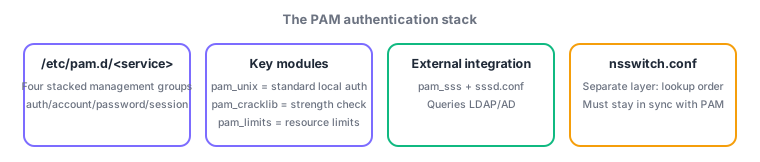
/etc/pam.d/sshd). The older, legacy alternative bundles every service into a single pam.conf. - Each config file is a stack of modules under four management groups: auth (identity verification), account (account status checks), password (password changes), and session (setup/teardown around a session). Each line's control flag—
required,requisite,sufficient, oroptional—decides how that module's pass/fail affects the stack. - nsswitch.conf decides the lookup order for name resolution (where to look up user/group info)—e.g.,
passwd: files sssmeans local files first, then sssd. This is a separate layer from PAM module selection, but external authentication integration requires the two to agree.
1.2.2Key PAM modules and external integration
- pam_unix is the most fundamental module: standard local user authentication and password management via
/etc/passwd//etc/shadow. - pam_cracklib runs in the password group and performs a strength check, rejecting dictionary words and passwords that are too short/simple.
- pam_limits runs in the session group and applies per-user resource limits (max processes, open files, etc.) based on
/etc/security/limits.conf. - pam_listfile is a general-purpose module that allows or denies users/groups listed in an arbitrary list file (e.g., restricting login to a service via an allow-list).
- pam_sss queries external directories (LDAP/Active Directory, etc.) for authentication and account info via sssd (System Security Services Daemon). sssd's own behavior is configured in sssd.conf.
The most-tested mappings: per-service config = /etc/pam.d/<service>, the four management groups = auth/account/password/session, strength checking = pam_cracklib, resource limits = pam_limits, external directory integration = pam_sss (plus sssd.conf). Do not confuse nsswitch.conf with PAM itself—it is a separate file that orders name resolution.
Build it up with a practical scenario. To strengthen SSH login password strength, add a pam_cracklib line to the password group in /etc/pam.d/sshd (or a shared file like password-auth) to reject weak password changes. To cap how many files or processes a logged-in user can open, place pam_limits in the session group and add a line like user01 hard nproc 100 to /etc/security/limits.conf. To unify login authentication with an internal Active Directory, install sssd, configure the target domain and auth method in sssd.conf, and wire pam_sss into the relevant service under /etc/pam.d/. You must also add sss to the passwd/group lines in nsswitch.conf, which controls lookup order—otherwise PAM can authenticate successfully while account info resolution still fails, so keeping both in sync is the practical crux. To restrict a maintenance-only service to a fixed list of allowed users, use pam_listfile with an allow-list.
| Module / file | Role | Group / layer |
|---|---|---|
| pam_unix | Standard local auth (/etc/passwd,shadow) | auth/account/password/session |
| pam_cracklib | Password strength check | password |
| pam_limits | Resource limits (limits.conf) | session |
| pam_listfile | Allow/deny via a list file | auth, etc. (general purpose) |
| pam_sss / sssd.conf | External directory integration | Via sssd (separate layer: must align with nsswitch.conf) |
Trap: "user resource limits (max processes, etc.) are set with pam_cracklib" is wrong—resource limits are pam_limits's job (paired with /etc/security/limits.conf); pam_cracklib is only for password strength checking. Also, "nsswitch.conf is a kind of PAM module" is wrong—nsswitch.conf is a separate file from PAM that orders name resolution.
1.2.3Section summary
- Config = /etc/pam.d/<service> (four groups: auth/account/password/session); strength = pam_cracklib / limits = pam_limits / allow-list = pam_listfile
- External integration = pam_sss + sssd.conf; must stay in sync with the separate nsswitch.conf for name resolution order
Sign in to track progress — Log in.
Quick check
(just a quick review)Q1. You want sshd to reject overly simple passwords (dictionary words, etc.) at password change time. Which PAM module should be added?
Q2. You integrated login authentication with an internal Active Directory. Authentication succeeds, but resolving user info (UID/GID, etc.) fails. What should you additionally check or fix?
Q3. Which set correctly lists the four PAM management groups (stack types) in a config file?
Keep track of your progress
The full study guide is free to read. Sign up free to practice with the question bank, track what you have read, review your mistakes, and highlight passages.