

What's changed: Initial version (topic 2.03, subtopics 2.03.1–2.03.3)
3.1Basic Network Configuration
Learn interface configuration centered on ip: assigning IP addresses, bringing links up/down, checking the routing table; how legacy ifconfig/route/arp map to it; managing NetworkManager with nmcli; and wireless tools iw/iwconfig/iwlist.
Before a server can do its job, its network interface needs the right IP address and the routing table needs to know where to send traffic. LinuC-2 expects you to handle both the modern ip command suite and the legacy commands (ifconfig, route, arp) still seen in the field.
3.1.1Configuring and inspecting with ip
- ip addr (
ip a) lists interfaces and their IP addresses. Add withip addr add 192.0.2.10/24 dev eth0, remove withip addr del. - ip link manages an interface's existence and state:
ip link set eth0 up|downactivates or disables the link;ip link set eth0 mtu 1400changes MTU. - ip route inspects and edits the routing table:
ip route showlists it,ip route add default via 192.0.2.1adds a default gateway,ip route delremoves an entry. - ip neigh (
ip n) inspects the ARP table (the IP-to-MAC address cache)—the successor to the legacy arp command (equivalent toarp -a).
3.1.2Legacy commands, nmcli, and wireless tools
- ifconfig is the legacy command combining what
ip addrandip linkdo (e.g.,ifconfig eth0 192.0.2.10 netmask 255.255.255.0 up). Deprecated on most distributions, part of the net-tools package. - route is the legacy counterpart of
ip route(route add default gw 192.0.2.1;route -nshows numeric output). arp is the legacy counterpart ofip neigh(arp -alists,arp -ddeletes). - nmcli drives NetworkManager from the CLI:
nmcli device status(interface state),nmcli connection show(list connection profiles),nmcli connection up/down <name>to activate or deactivate. - Wireless: iw (current, netlink-based;
iw dev wlan0 scanscans for APs), iwconfig/iwlist (legacy wireless-tools;iwconfigshows settings,iwlist wlan0 scanscans).
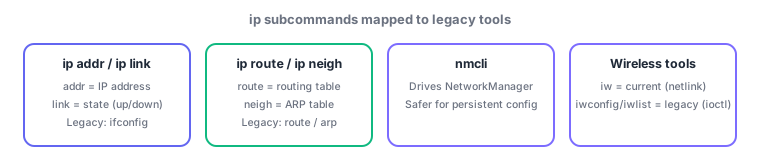
The most-tested point is the mapping: ip addr↔ifconfig, ip route↔route, ip neigh↔arp. Also watch the division of labor between ip link and ip addr (link = state, addr = address). nmcli only affects NetworkManager-managed connections; iw is netlink-based while iwconfig/iwlist use the older ioctl interface—another generational contrast.
Diagnose in the order state → address → route → neighbor. First check ip link show eth0 for UP status and carrier detection (cable or radio). Then ip addr show eth0 to confirm the expected IP is assigned, fixing with ip addr add/del if not. For routing problems, ip route show reveals whether a default gateway or a specific subnet route is missing. If connectivity still fails, ip neigh shows whether the peer's MAC address resolved (an INCOMPLETE state means ARP resolution failed). On systems where NetworkManager is active (most desktops, some server distros), changes made directly via ip can be reverted on reboot or NetworkManager re-application, so permanent changes belong in a NetworkManager profile via nmcli connection modify. For wireless troubleshooting, check iw dev for the interface mode (managed/monitor), then iw dev wlan0 link for the current connection (SSID, signal strength), rescanning nearby APs with iw dev wlan0 scan as needed.
| Current (ip subcommand) | Legacy command | Purpose |
|---|---|---|
| ip addr | ifconfig | Show/add/remove IP addresses |
| ip link | ifconfig (up/down) | Bring interface up/down, check state |
| ip route | route | Show/modify routing table |
| ip neigh | arp | Inspect the ARP (IP-MAC) table |
Trap: "ip link set eth0 up also assigns an IP address" is wrong—ip link handles only link state (up/down, MTU, etc.); assigning an address requires ip addr add. Also, do not assume nmcli changes are more temporary than ip changes—it is the reverse: ip changes are transient (lost on reboot), while nmcli connection profiles persist.
3.1.3Section summary
- ip addr = ifconfig, ip link = state (up/down), ip route = route, ip neigh = arp; use nmcli for persistent settings
- Wireless: iw (current, netlink) vs iwconfig/iwlist (legacy, ioctl). Diagnose in order: state → address → route → neighbor
Sign in to track progress — Log in.
Quick check
(just a quick review)Q1. You need to add IP address 192.0.2.10/24 to eth0 using the current ip command suite. Which is correct?
Q2. A server cannot reach the outside world via the default gateway. What should you first check with ip route show?
Q3. On a server where NetworkManager is active, you want an IP address change to survive a reboot. What is the best approach?
Keep track of your progress
The full study guide is free to read. Sign up free to practice with the question bank, track what you have read, review your mistakes, and highlight passages.