

What's changed: Initial version (topic 2.02, subtopics 2.02.1–2.02.3)
2.2Managing Filesystems
Learn to create, check, and maintain filesystems: creation with the mkfs family, integrity checks with fsck, ext-family tuning and backup via tune2fs/dumpe2fs/dump/restore, dedicated XFS tools (xfs_info, xfs_repair, xfsdump, xfsrestore), the next-generation Btrfs (subvolumes, snapshots, btrfs, btrfs-convert), and disk health monitoring with smartd/smartctl.
A filesystem is not "create and forget"—it must be checked, tuned, and backed up throughout its operational life. ext4, XFS, and Btrfs each embody a different design philosophy with its own tool family, so mapping "which command belongs to which filesystem" accurately matters both in practice and on the exam.
2.2.1Creation and integrity checks
- mkfs is the generic command to create a filesystem; the real work happens in per-type implementations like mkfs.* (
mkfs.ext4,mkfs.xfs,mkfs.btrfs), withmkfs -t ext4acting as a wrapper that calls them. Creation is a destructive operation that discards any existing data. - fsck is the generic integrity-check-and-repair command, implemented per type as fsck.* (e.g.,
fsck.ext4). Running it against a mounted filesystem is generally unsafe (risk of corruption); the standard practice for the root filesystem is to check it in single-user or rescue mode at boot.
2.2.2ext-family tuning/backup, XFS, Btrfs, and SMART
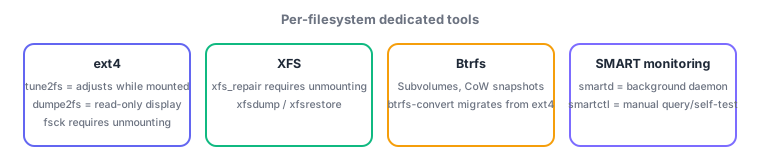
- tune2fs adjusts ext2/3/4 parameters (label, reserved-block percentage, check interval, etc.) while the filesystem stays mounted. dumpe2fs displays detailed information such as the superblock and block-group data (read-only, no changes).
- dump/restore form the traditional pair for full, differential, and incremental backup/restore of ext-family filesystems (dump levels manage generations).
- XFS-specific tools (dot-separated naming): xfs_info (show layout),
xfs_check(legacy check), xfs_repair (repairs while unmounted; fsck.xfs is effectively a no-op), and xfsdump/xfsrestore (the XFS equivalents of dump/restore). - Btrfs splits one filesystem into independent namespaces via subvolumes, and its snapshots use copy-on-write (CoW) for instant, space-efficient point-in-time captures. Operations are unified under btrfs subcommands like
btrfs subvolume create/listandbtrfs subvolume snapshot; migrating an existing ext filesystem in place uses btrfs-convert. - smartd is a background daemon that continuously monitors SMART (Self-Monitoring, Analysis and Reporting Technology)-capable disks (logging/notifying on threshold breaches). smartctl is the tool for manual queries and self-tests (
smartctl -a /dev/sdalists attributes;smartctl -t shortstarts a test).
The staples: fsck must not run on a mounted filesystem (check root in single-user mode); tune2fs adjusts while mounted, dumpe2fs is read-only; xfs_repair requires unmounting; fsck.xfs is effectively a no-op; Btrfs snapshots are built on copy-on-write; smartd = continuous monitoring daemon, smartctl = manual query/self-test. The mapping of filesystem type to its dedicated tool family (.ext4 suffix vs xfs_ prefix vs btrfs subcommands) recurs often.
Mapping the tradeoffs of the three filesystems makes exam context easier to read. ext4 offers proven maturity and broad track record, backed by a settled tool family (tune2fs, dumpe2fs, dump/restore)—a safe default for straightforward use cases. XFS is designed for large capacity and highly parallel I/O; xfs_repair supports largely online operations day-to-day (though the repair itself requires unmounting), and xfsdump/xfsrestore provide level-based backups—popular for large file servers and databases. Btrfs differentiates itself with CoW-based subvolumes and snapshots, making it easy to "snapshot before a production change, then instantly roll back if something goes wrong." To migrate an existing ext4 filesystem to Btrfs without rebuilding data, use btrfs-convert—but note the converted filesystem retains rollback information pointing back to the original ext4 image, which must be explicitly discarded once you commit to the conversion. Disk-level physical health is monitored on a separate axis via SMART: run smartd continuously to catch threshold breaches, and when suspicious signs appear (e.g., rising reallocated sector counts), run a detailed self-test with smartctl -t long before proceeding to disk replacement if warranted—the standard workflow for managing hardware-failure precursors.
| Filesystem | Create/repair tools | Characteristics |
|---|---|---|
| ext4 | mkfs.ext4, fsck.ext4, tune2fs | Mature, general-purpose, well-proven |
| XFS | mkfs.xfs, xfs_repair (unmount required) | Strong for large capacity & parallel I/O |
| Btrfs | mkfs.btrfs, btrfs, btrfs-convert | CoW-based subvolumes/snapshots |
Trap: "fsck can safely run on a mounted filesystem" is wrong—fsck on a mounted filesystem risks corruption; the standard practice is to check the root filesystem in single-user/rescue mode. Likewise, "XFS lets you run xfs_repair while mounted" is wrong—xfs_repair assumes the filesystem is unmounted. And "dumpe2fs can change filesystem settings" is wrong—dumpe2fs is a read-only display tool; changes go through tune2fs.
2.2.3Section summary
- mkfs/fsck are generic, with per-type
.typeimplementations. fsck requires unmounting (root: single-user mode); tune2fs adjusts while mounted, dumpe2fs is read-only - XFS = xfs_repair (unmount required), xfsdump/xfsrestore / Btrfs = CoW subvolumes, snapshots, btrfs-convert / SMART = smartd daemon, smartctl manual query
Sign in to track progress — Log in.
Quick check
(just a quick review)Q1. A production server's root filesystem (ext4) shows signs of filesystem errors. What is the correct, safe procedure to check and repair it with fsck?
Q2. You suspect corruption in an XFS filesystem and want to repair it with xfs_repair. What must you do first?
Q3. Before a major configuration change on a system running Btrfs, you want to be able to instantly revert if something goes wrong. What is the best preparation?
Keep track of your progress
The full study guide is free to read. Sign up free to practice with the question bank, track what you have read, review your mistakes, and highlight passages.