

What's changed: In-scope service coverage (axis B): added definitions, roles, and selection criteria for EKS/EFS (s1), AppSync/ELB/Route 53/WAF (s2), and Aurora (s3).
1.3Working with Data in Amazon DynamoDB
Understand DynamoDB tables and keys (partition/sort key), Query vs. Scan, and global secondary indexes (GSI)—the data layer for serverless apps.
The go-to data store for serverless apps is Amazon DynamoDB—a key-value NoSQL database with single-digit-millisecond latency at scale.
1.3.1Tables and keys
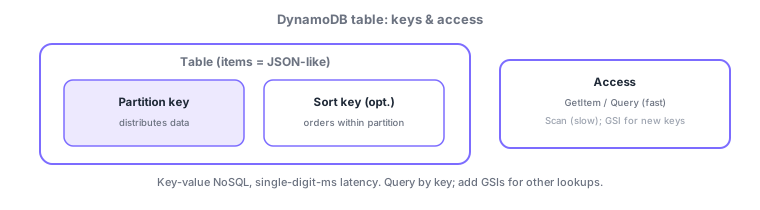
- Partition key: the primary key that physically distributes items; skewed values cause a hot partition and hurt performance.
- Sort key (optional): orders items within a partition and enables range queries (begins_with, between).
- Query: retrieves fast by partition key (+ sort key condition). Scan reads the whole table—slow and costly.
- GSI (global secondary index): add to query by non-key attributes (its own key schema). LSI uses the same partition key with a different sort key.
Unlike relational DBs, DynamoDB requires you to define access patterns first, then design the table. Read mainly with Query (fast/cheap by key); Scan (full table read) is slow and costly, so avoid overusing it. To query by non-key attributes, add a GSI (can be added later). Performance hinges on partition-key distribution—skew creates a hot partition that exhausts throughput and gets throttled. Choose on-demand capacity (automatic, no forecasting) or provisioned (fixed + Auto Scaling, cheaper for steady load). Reads can be default eventually consistent (cheaper, slight lag) or strongly consistent. DynamoDB Streams turn item changes into events for Lambda.
| Goal | Means |
|---|---|
| Fast retrieval by key | Query (avoid Scan) |
| Query by non-key attribute | GSI |
| Range query/ordering | Sort key |
| Unpredictable load | On-demand capacity |
| Event on changes | DynamoDB Streams (→Lambda) |
Scenario: order management. Use customerId as partition key and orderDate as sort key to Query "a customer’s orders, newest first" quickly. When a need to search by status arises, add a GSI (keyed on status). Avoid Scan. Choose on-demand capacity for unpredictable access. Wire post-order processing via DynamoDB Streams → Lambda. Design customerId to avoid skew and hot partitions.
Watch the mix-ups: (1) Query (fast by key) vs Scan (full, slow/costly)—don’t overuse Scan. (2) GSI (non-key query, own key schema) vs LSI (same partition key, different sort key). (3) Partition-key skew = hot partition (causes throttling). (4) Read consistency: eventual (default, cheap) / strong.
Q. Query or Scan? Prefer Query (fast/cheap by key); avoid Scan (full table, slow/costly). Q. Query by non-key attribute? Add a GSI (can be added later). Q. Hot partition? Skewed partition-key values concentrate access on one partition and cause throttling. Q. Trigger on changes? Use DynamoDB Streams to invoke Lambda.
Common on DVA: fast retrieval by key = Query vs slow full read = Scan, non-key query = GSI, distribution depends on the partition key (skew = hot partition), change events = DynamoDB Streams. Avoid overusing Scan; design from access patterns.
(For awareness) Amazon Q Developer: The late-2024 DVA-C02 revision added Amazon Q Developer, a generative-AI assistant for development, to scope. It does in-IDE code completion, generation, explanation, and fix suggestions, and answers questions about AWS resources. As a developer-productivity tool, remember "AWS AI coding assistant = Amazon Q Developer."
1.3.2When you need relational: Amazon Aurora
Not all data fits NoSQL. When you need joins, complex transactions, or a fixed schema, choose the relational Amazon Aurora. Aurora is a MySQL/PostgreSQL-compatible managed relational database: storage auto-grows, up to 15 read replicas scale reads, and a multi-AZ cluster provides high availability. For variable or intermittent load, Aurora Serverless scales capacity automatically. Rule of thumb: key-value, ultra-low latency, horizontal scale = DynamoDB; joins, strong consistency, existing SQL assets = Aurora (RDS). In serverless setups where connections fluctuate, add RDS Proxy to pool connections and avoid exhaustion.
| Requirement | Choice |
|---|---|
| Joins, complex transactions, fixed schema | Amazon Aurora (RDS) |
| Key-value, ultra-low latency, scale-out | Amazon DynamoDB |
| Pool serverless connections | RDS Proxy |
1.3.3Section summary
- Keys = partition key (distribute; skew = hot partition) + sort key (order/range)
- Query fast / Scan slow; non-key = GSI; changes = Streams→Lambda; capacity = on-demand/provisioned
Sign in to track progress — Log in.
Quick check
(just a quick review)Q1. Which key physically distributes items in DynamoDB?
Q2. Which operation efficiently retrieves items by key in DynamoDB?
Q3. You want to query DynamoDB by a non-key attribute. What do you add?
Keep track of your progress
The full study guide is free to read. Sign up free to practice with the question bank, track what you have read, review your mistakes, and highlight passages.