

What's changed: Added vector/semantic search (embeddings, RAG) to Cosmos DB to reflect the 2026 refresh’s AI emphasis in the non-relational domain.
3.2Azure Storage Services
Understand the Blob, File, Table, and Queue services of an Azure storage account, Blob access tiers, and their uses.
An Azure storage account is a container bundling several storage services for different needs. Pick Blob, File, Table, or Queue by the data’s shape (objects / shared files / key-value / messages) and use. All offer high durability (redundancy) and pay-as-you-go pricing.
3.2.1The four services
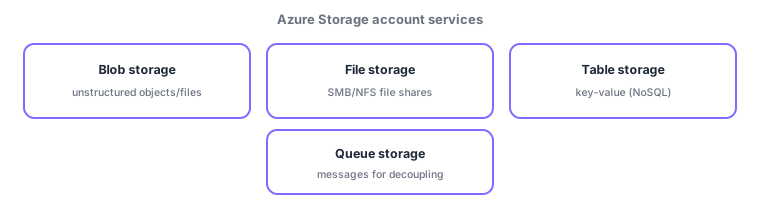
- Blob storage: object storage for unstructured data (images, video, backups, logs)—the most widely used.
- File storage: SMB/NFS file shares mountable from multiple machines—replaces on-prem file servers.
- Table storage: simple, inexpensive key-value (NoSQL) tables for large volumes of lightweight structured data.
- Queue storage: a message queue to decouple components and smooth processing spikes.
| Service | Holds | Typical use |
|---|---|---|
| Blob | Unstructured objects | Images, video, backups, logs |
| File | Shared files | SMB/NFS file shares |
| Table | Key-value data | Cheap NoSQL tables |
| Queue | Messages | Decoupling components |
3.2.2Blob access tiers
Blob offers access tiers that trade storage cost against retrieval cost by access frequency. Hot suits frequently accessed data (higher storage price); Cool suits infrequently used data (cheaper storage but retrieval costs); Archive is cheapest for long-term retention but needs time to retrieve (rehydration). To keep old logs/backups cheap, match the tier to frequency or move data automatically.
Scenario: a video service’s storage. Playback video files go to Blob (hot), shared editing assets to a File share, lightweight view-log structured data to Table, and encoding requests onto a Queue for workers to process in order. Videos unwatched for six months move to the Cool/Archive tier to cut cost. Choose service and tier by shape and frequency.
Watch the mix-ups: (1) Blob (objects: images/video/backups) vs File (mountable shared files)—if "mounted as files from multiple machines," use File. (2) Table (Storage key-value) is cheap NoSQL, different in scale/features from Cosmos DB (rich, globally distributed) in the previous section. (3) Queue (messaging/decoupling) is more an integration mechanism than data storage.
Q. Table storage vs Cosmos DB Table API? Both are key-value, but Cosmos DB adds global distribution and latency SLAs. Use Cosmos DB for large/high-performance needs; Storage Table when cheap-and-simple suffices. Q. Can Archive data be read instantly? No—retrieval needs rehydration time, so it is unsuitable for immediate access. Q. Is a storage account a single service? No—one account provides Blob/File/Table/Queue together.
Common mappings: images/video/backups = Blob, file shares = File, key-value = Table, messaging/decoupling = Queue. Blob’s access tiers (hot/cool/archive) for cost optimization are also tested.
3.2.3Section summary
- Storage account bundles Blob (unstructured) / File (shares) / Table (key-value) / Queue (messages)
- Blob optimizes cost by access tier (hot/cool/archive) based on frequency
- Don’t confuse "mounted shared files = File" with "simple objects = Blob"
Sign in to track progress — Log in.
Quick check
(just a quick review)Q1. Which Azure Storage service fits storing unstructured data like images, video, and backups?
Q2. Which provides SMB/NFS file shares mountable from multiple machines?
Q3. Which Azure Storage service decouples app components via messages?
Q4. Which Blob access tier stores rarely accessed data most cheaply for the long term?
Q5. Which storage account service fits simple, inexpensive key-value tables?
Keep track of your progress
The full study guide is free to read. Sign up free to practice with the question bank, track what you have read, review your mistakes, and highlight passages.