

What's changed: Deepened DP-900 Chapter 2 to the AZ-900 baseline (tables/types/keys/indexes/views/normalization + SQL category table & code, Azure relational services + IaaS/PaaS table, selection scenarios, FAQ). Localized 2 figures
2.2Azure Relational Data Services
Understand Azure’s relational services—Azure SQL Database, SQL Managed Instance, SQL Server on VM, Azure Database for PostgreSQL/MySQL—plus the IaaS vs PaaS responsibility split and how to choose.
Azure offers several relational services. Two axes guide the choice: how much you want to manage (IaaS vs PaaS) and which engine (SQL Server family, or open source like PostgreSQL/MySQL). In the cloud, "operational effort" and "freedom of control" trade off against each other.
2.2.1Key services
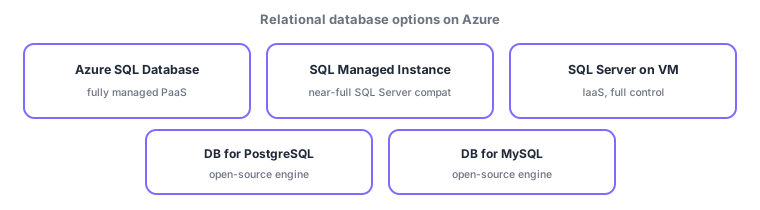
- Azure SQL Database: fully managed PaaS; Azure handles patching, backups, and availability. Best for new cloud apps.
- SQL Managed Instance: PaaS with near-full SQL Server compatibility; good for migrating (lift-and-shift) existing SQL Server.
- SQL Server on VM: IaaS; you manage down to the OS with full control—for special configs or OS-level requirements.
- Azure Database for PostgreSQL / MySQL: managed services for open-source engines; for existing OSS apps (note: Azure Database for MariaDB was retired in September 2025).
| Service | Model | Control / ops effort | Best for |
|---|---|---|---|
| Azure SQL Database | PaaS | Less control / less effort | New cloud apps |
| SQL Managed Instance | PaaS | Medium / medium | Migrate from SQL Server |
| SQL Server on VM | IaaS | Full control / more effort | Need OS-level control |
| DB for PostgreSQL/MySQL | PaaS | Less control / less effort | Use OSS engines |
2.2.2IaaS vs PaaS responsibilities
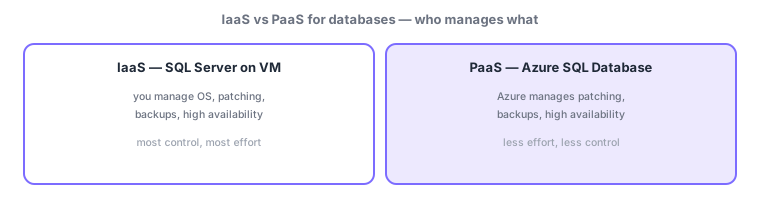
In IaaS (SQL Server on VM), Azure covers hardware and virtualization, while OS, SQL Server patching, backups, and availability are your responsibility—maximum freedom, maximum effort. In PaaS (Azure SQL Database, etc.), Azure takes over those operations, so you focus on data, schema, and access control—less effort, but you give up some freedom such as direct OS access. This is the shared responsibility model applied to databases.
Scenario: three choices. (1) A brand-new cloud business app → offload ops with Azure SQL Database (PaaS). (2) Move on-prem SQL Server unchanged → SQL Managed Instance (high compatibility). (3) OS-level agents or legacy configs required → SQL Server on VM (IaaS). If the existing app uses PostgreSQL → Azure Database for PostgreSQL.
Watch the mix-ups: (1) In PaaS (Azure SQL Database), Azure does patching/backups—do not assume you must. (2) Managed Instance = migration/compatibility, Azure SQL Database = new app/minimal ops. (3) Only SQL Server on VM is IaaS; the rest are PaaS. (4) These are relational; Cosmos DB (next chapter) is non-relational and different.
Q. Both Azure SQL Database and SQL Managed Instance are PaaS—what differs? SQL Database centers on single databases with minimal ops; Managed Instance offers high compatibility with SQL Server instance features (SQL Agent, cross-DB queries) for migration. Q. With PaaS, do I run backups? No—Azure backs up automatically (with point-in-time restore in the retention window). Q. Can I use open-source DBs? Yes—managed PostgreSQL and MySQL (Azure Database for MariaDB was retired in September 2025).
Common mappings: fully managed PaaS = Azure SQL Database, control down to OS = SQL Server on VM (IaaS), migrate from SQL Server = Managed Instance, OSS engines = Azure Database for PostgreSQL/MySQL. In PaaS, Azure handles patching and backups.
2.2.3Section summary
- Azure SQL Database = fully managed PaaS (new app, minimal ops), SQL Server on VM = IaaS (full control)
- Managed Instance = high SQL Server compat (migration), PostgreSQL/MySQL = managed OSS engines
- PaaS offloads ops to Azure (patching/backup/availability); IaaS is freer but higher effort
Sign in to track progress — Log in.
Quick check
(just a quick review)Q1. Which fully managed relational PaaS lets Azure handle patching, backups, and availability?
Q2. Which option fits when you want full control, managing down to the OS?
Q3. Which PaaS best fits migrating from on-premises SQL Server with high compatibility?
Q4. Which service fits using open-source engines like PostgreSQL or MySQL as managed services?
Q5. Which is correct about operational responsibility in PaaS (Azure SQL Database)?
Keep track of your progress
The full study guide is free to read. Sign up free to practice with the question bank, track what you have read, review your mistakes, and highlight passages.