

What's changed: Deepened DP-100 Chapter 2 (ja figures; comparison tables/scenarios/FAQ/traps/deep paragraphs in all sections)
2.1Running and Tracking Jobs (MLflow)
Understand training models with Azure ML jobs (command/sweep/pipeline), tracking metrics/parameters/artifacts via MLflow, environments (dependencies), and reuse via components.
Model training runs as an Azure ML job. Results (metrics, models) are tracked and compared automatically via MLflow.
2.1.1Jobs and tracking
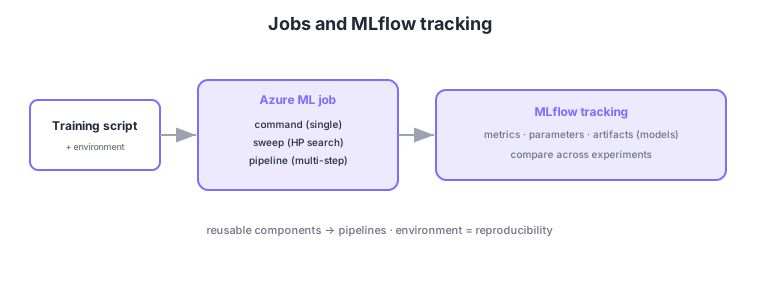
- Command job: the basic job running one script with arguments and inputs/outputs.
- MLflow tracking: auto-log metrics, parameters, artifacts (models) and compare across experiments.
- Environment: define training dependencies (conda/Docker) for reproducibility.
- Components/pipelines: connect reusable units (components) into a pipeline.
Common on DP-100: run training = jobs (command/sweep/pipeline), log/compare metrics/params/models = MLflow, dependencies = environment (conda/Docker), reuse = components → pipeline. MLflow and environments are key to comparison and reproducibility.
MLflow is an open-source standard natively integrated in Azure ML; log metrics via APIs like mlflow.log_metric.
Azure ML (v2) jobs come in types: a command job (run one script with arguments, I/O, environment, and compute), a sweep job (hyperparameter search), and a pipeline job (a DAG connecting components). Define them in YAML (CLI v2) or the Python SDK v2, specifying an environment (a curated one or a custom conda/Docker) and inputs/outputs (data-asset or datastore paths) for reproducibility. Tracking uses natively integrated MLflow: mlflow.log_metric/log_param/log_artifact or autolog group metrics/params/models into an experiment compared in Studio. Registering a trained model in the MLflow model format (with environment and signature) makes deployment easy. A component is a reusable unit with inputs/outputs/environment/code, composed into pipelines for team sharing and CI/CD. Summary: “single run = command,” “HP search = sweep,” “multi-step = pipeline,” “log/compare = MLflow,” “reproducibility = environment + data assets.”
| Job type | Use | Example |
|---|---|---|
| Command job | Run a single script | Train one model |
| Sweep job | Hyperparameter search | Tune learning rate/depth |
| Pipeline job | Connect multiple components | Prep → train → evaluate |
Scenario: run prep → train → evaluate reproducibly and compare results. → Componentize each step into a pipeline job, pin dependencies via an environment, and reference I/O with data assets. MLflow logs each run’s metrics/models, so compare in the experiment view and pick the best. Defining it in CLI v2 YAML also enables CI/CD.
FAQ: Q. How do I log metrics? → A. Use MLflow log APIs (log_metric/log_param/log_artifact) or autolog, and compare in Studio experiments. Q. Why an environment? → A. To pin dependencies so jobs reproduce on different compute or at a later time.
Trap: “use a command job for hyperparameter search” is wrong—HP search is a sweep job (command jobs are single runs). Also “you need a custom mechanism to compare metrics” is wrong—Azure ML natively integrates MLflow for experiment comparison.
2.1.2Section summary
- Train = jobs, log/compare = MLflow
- Reproducibility = environments, reuse = components/pipelines
Sign in to track progress — Log in.
Quick check
(just a quick review)Q1. What is the basic unit for running a training script in Azure ML?
Q2. You want to log metrics/params/models and compare experiments. What do you use?
Q3. Which Azure ML element defines library dependencies for reproducible training?