

What's changed: In-scope coverage (fix): added AWS WAF (L7 web protection; SQLi/XSS/rate-limit via IaC) to the Network Firewall block (closes an Axis-B textbook gap)
6.2Threat Detection and Compliance Automation
Understand continuous security governance—GuardDuty, Security Hub, AWS Config, Inspector, Macie, and auto-remediation. Run detect/evaluate/remediate automatically.
Security must be continuously automated: detect threats, evaluate configuration compliance, and auto-remediate drift.
6.2.1Detect, evaluate, remediate
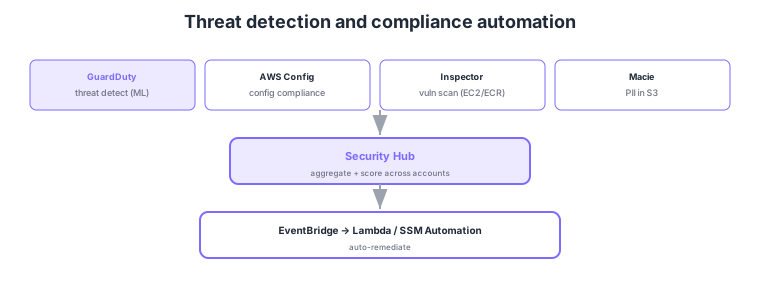
- GuardDuty: ML analysis of logs to detect threats/anomalies.
- AWS Config: continuously evaluate configuration against rules, detecting drift (with remediation).
- Inspector / Macie: Inspector = vulnerability scanning (EC2/ECR), Macie = sensitive-data discovery in S3.
- Security Hub: aggregate and score findings across services/accounts.
Common on DOP-C02: threat detection = GuardDuty, config compliance/drift = Config, vulnerability scanning = Inspector, S3 sensitive-data discovery = Macie, central finding aggregation = Security Hub, plus detect → EventBridge → auto-remediate. Don’t mix up the roles (detect/evaluate/scan/aggregate).
DOP-C02 security automation probes designing continuous detect/evaluate/aggregate/remediate across the whole org. GuardDuty ingests VPC flow logs, DNS logs, and CloudTrail to detect threats with ML, centrally managing all members from the org delegated administrator. AWS Config continuously evaluates compliance with managed/custom rules, distributes rule sets org-wide as Conformance Packs, and attaches remediation actions to violations. Amazon Inspector continuously scans EC2, ECR container images, and Lambda for vulnerabilities, while Amazon Macie discovers and classifies sensitive data (PII, etc.) in S3. Findings aggregate into Security Hub in ASFF format, providing scores against CIS and the AWS Foundational Security Best Practices plus cross-cutting visibility. Remediation hinges on EventBridge, which receives Security Hub findings or Config noncompliance events and triggers Lambda/SSM Automation/Step Functions by severity. Across an org, aggregate each service to a delegated administrator and ship logs to a central security account. From a DevOps view, integrate these into the pipeline (block deploys on ECR scan results, detect IaC drift with Config rules) and build security in continuously (DevSecOps) rather than bolting it on later.
| Role | Service | Target/trait |
|---|---|---|
| Threat detection | GuardDuty | ML on logs; suspicious behavior |
| Config compliance | AWS Config | Rule eval + remediation; Conformance Packs |
| Vulnerability scan | Inspector | CVEs in EC2/ECR/Lambda |
| Sensitive-data discovery | Macie | Classify PII in S3 |
Scenario: View multi-account security findings in one place—auto-remediate the serious ones and only notify for the rest. → Aggregate GuardDuty/Config/Inspector/Macie to a delegated administrator account and collect findings in Security Hub for scoring. Receive Security Hub findings via EventBridge and route by severity: CRITICAL/HIGH auto-remediated by SSM Automation/Lambda, MEDIUM and below notified to the security team via SNS.
FAQ: GuardDuty vs Inspector vs Macie vs Config? GuardDuty is behavior-based threat detection, Inspector is known-vulnerability (CVE) scanning, Macie is S3 sensitive-data discovery, and Config is configuration-compliance evaluation. They differ by the "type" of finding, and all feed into Security Hub. Distinguish by the question’s keyword (threat/vulnerability/sensitive data/configuration).
Exam trap: Choosing GuardDuty to "scan EC2/containers for vulnerabilities" is wrong—vulnerability scanning is Inspector. GuardDuty is behavioral threat detection, not a patch/CVE scanner. Likewise, "is configuration compliant with mandatory encryption" is Config, and aggregating findings is Security Hub—keep the roles strictly distinct.
6.2.2Post-detection root-cause analysis (Amazon Detective)
Detective (Amazon Detective) supports root-cause analysis and blast-radius investigation starting from findings generated by GuardDuty and other security services. It automatically ingests VPC flow logs, CloudTrail, and GuardDuty findings, then visualizes relationships among entities (IP addresses, users, resources) as a behavior graph. Security analysts can drill into questions like "when and which resources did this IP touch?" or "when did this IAM user start behaving abnormally?" Where GuardDuty detects "something is wrong," Detective resolves "why and how far did it spread?" Because Detective automatically aggregates and graphs the data instead of requiring manual log correlation, it reduces mean time to respond (MTTR).
| Service | Role | Typical use |
|---|---|---|
| GuardDuty | Threat/anomaly detection (finding generation) | Discover "something is wrong" |
| Detective | Root-cause analysis from findings | Investigate "why and how far it spread" |
| Security Hub | Aggregate and score findings from multiple services | Cross-org security posture visibility |
"Investigate GuardDuty findings to identify cause and blast radius = Amazon Detective." Detective specializes in post-detection investigation (forensics support), not detection itself. Choose Detective when a question asks "why did the breach happen" or "which resources were affected." On questions that combine GuardDuty, Security Hub, and Detective, keep the roles distinct: detection / aggregation / investigation.
6.2.3Network-layer defense (Network Firewall) and web protection (WAF)
Network Firewall (AWS Network Firewall) is a managed stateful firewall deployed in your VPC. Beyond security groups (per-instance allow lists) and NACLs (per-subnet allow/deny), it performs domain-name filtering (egress only to allowed domains), intrusion prevention via Suricata-compatible IPS signatures, and L3–L7 traffic inspection. In DevOps, a common pattern pairs it with Transit Gateway to centrally inspect egress from multiple VPCs in one place, restricting traffic to approved external services only. Distinguish the roles: SG/NACL do "simple port/IP control," while Network Firewall provides "centralized, domain/signature-based network governance."
Protecting application-layer (L7) web requests is AWS WAF (Web Application Firewall). Placed in front of CloudFront, ALB, or API Gateway, it uses rules to block malicious requests such as SQL injection, cross-site scripting, and rate excess (bots/brute force). In DevOps, the common practice is to codify WAF rules (including managed rule groups) via CloudFormation/Firewall Manager and apply them consistently across accounts and distributions. Distinguish: Network Firewall (L3–L7 network governance for the VPC) vs WAF (L7 request protection for public web endpoints)—different layers and placement.
6.2.4Section summary
- Detect = GuardDuty / evaluate = Config / scan = Inspector / sensitive = Macie
- Aggregate = Security Hub / remediate = EventBridge → Lambda/SSM
- Investigate = Detective (root-cause and blast radius from findings)
- Network defense = Network Firewall (domain/IPS; centralized egress inspection) / web protection = WAF (L7; SQLi/XSS/rate-limit applied consistently via IaC)
Sign in to track progress — Log in.
Quick check
(just a quick review)Q1. You want to auto-scan EC2 and container images (ECR) for known vulnerabilities. What?
Q2. You want to auto-discover and classify PII stored in S3. What?
Q3. You want to aggregate security findings across accounts and score/visualize posture. What?
Keep track of your progress
The full study guide is free to read. Sign up free to practice with the question bank, track what you have read, review your mistakes, and highlight passages.