

What's changed: In-scope coverage: added a security/identity in-scope services block to Ch5 (IAM Identity Center/Cognito/Directory Service/Certificate Manager/CloudHSM/Firewall Manager/Detective/Audit Manager)
5.1The Shared Responsibility Model and IAM
Understand the AWS shared responsibility model (AWS secures "of the cloud," you secure "in the cloud") and IAM users, groups, roles, policies, least privilege, and protecting the root user.
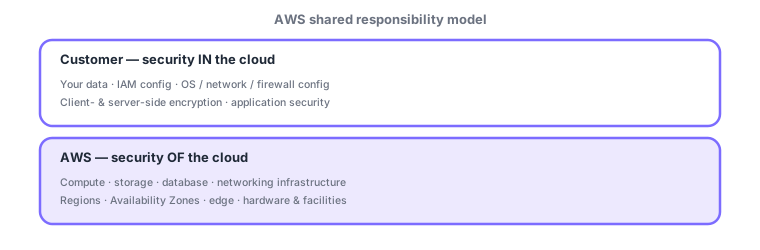
Cloud security is shared between AWS and you. Knowing what AWS secures and what you secure is the starting point. The mnemonic is simple: AWS = security "of" the cloud, you = security "in" the cloud. On your side, IAM is central—managing "who can do what" with least privilege.
5.1.1The shared responsibility model
- AWS: "security of the cloud"—physical hardware, Regions/AZs/edge, and the underlying managed-service infrastructure.
- You: "security in the cloud"—your data, IAM config, OS/network/firewall config, encryption, and application security.
- The boundary shifts by service (e.g., with EC2 you own the OS; with S3 or Lambda your share is smaller).
| Item | Owner |
|---|---|
| Physical datacenter/hardware | AWS |
| Regions/AZs/edge, core network | AWS |
| Data (content, encryption) | Customer |
| IAM config / access management | Customer |
| Guest OS/network/firewall config | Customer (for IaaS) |
5.1.2IAM (Identity and Access Management)
- Users: identities for people or apps. Groups: collections of users to grant permissions together (best practice: attach to groups, not individuals).
- Roles: assume temporary permissions; used by AWS services (e.g., EC2) and for federation/cross-account access (no long-lived keys).
- Policies: define allow/deny in JSON, attached to users/groups/roles; follow the principle of least privilege (grant only what is needed).
Strengthen authentication with MFA. To manage many accounts/users at scale, use IAM Identity Center (formerly SSO) for centralized access. The key idea is "hand out temporary permissions via roles when needed, rather than distributing long-lived access keys."
The root user has full power: enable MFA, avoid daily use, and use IAM users/roles instead. Never share access keys or hard-code them in code.
Scenario: designing team access. Put developers in a "Developers" group and attach the needed policy to the group (not individuals). When an app on EC2 reads S3, pass temporary permissions via a role (no embedded keys). Lock the root user with MFA after initial setup and avoid daily use. Require MFA for everyone.
Watch the mix-ups: (1) user (a permanent identity) vs role (temporarily assumed permissions)—use roles for services/temporary access. (2) Grant permissions via group/role policies (attaching to individuals is hard to manage). (3) Do not use the root user routinely. (4) Shared responsibility: data and IAM config are always the customer.
Common points: AWS = of the cloud / you = in the cloud, IAM users/groups/roles/policies, least privilege, protecting the root user (MFA, no daily use), and roles = temporary permissions (no keys).
5.1.3Section summary
- Shared responsibility: AWS = of the cloud / you = in the cloud (data and IAM config are always yours)
- IAM = users/groups/roles/policies for least privilege; roles = temporary permissions (no keys)
- Protect the root user with MFA and avoid daily use; require MFA for all
Sign in to track progress — Log in.
Quick check
(just a quick review)Q1. In the shared responsibility model, what is generally AWS’s responsibility?
Q2. Which IAM construct best grants temporary permissions to an EC2 instance or AWS service?
Q3. Which follows the principle of least privilege?
Q4. Which is the recommended handling of the root user?
Q5. Which IAM construct best grants the same permissions to multiple users at once?
Keep track of your progress
The full study guide is free to read. Sign up free to practice with the question bank, track what you have read, review your mistakes, and highlight passages.