

What's changed: Deepened AZ-400 Chapter 4 (added comparison tables, scenarios, FAQs, exam traps, deep-dive paragraphs to each section; localized figures to Japanese)
4.1Integrating Security into Pipelines (DevSecOps)
Understand shifting security left—SAST/DAST, dependency scanning, container image scanning, IaC scanning, and GitHub Advanced Security. Detect vulnerabilities early in the pipeline.
DevSecOps shifts security left (earlier). Embed scans in the pipeline to stop vulnerabilities before production.
4.1.1Types of scanning
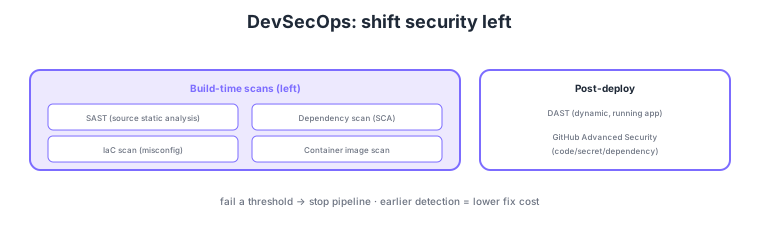
- SAST: static analysis to find source-code vulnerabilities (pre/during build).
- Dependency scanning (SCA): detect known vulnerabilities in OSS libraries.
- Container/IaC scanning: detect image vulnerabilities and template misconfigurations.
- DAST: dynamic analysis on a running app post-deployment.
Common on AZ-400: static source analysis = SAST, known OSS vulnerabilities = dependency scanning (SCA), dynamic analysis of running app = DAST, container/IaC misconfig = image/IaC scanning, integration on GitHub = Advanced Security (code/secret/dependency). Earlier (left) detection lowers fix cost.
AZ-400 DevSecOps probes "weaving security into the pipeline and running different scan types at the right places." SAST (static analysis) finds injections and unsafe API use without running code, halting early at PR/build. Dependency scanning (SCA) detects known vulnerabilities (CVEs) and license issues in OSS libraries, raising auto-PRs via Dependabot, etc. Container image scanning finds base-image/layer vulnerabilities, and IaC scanning finds misconfigurations (public storage, excessive permissions) in Bicep/Terraform/ARM. Since these inspect without "running" code, they sit left (early). By contrast, DAST (dynamic analysis) sends real requests to the deployed, running app to find runtime vulnerabilities, so it runs in staging, etc. On GitHub, integrate via GitHub Advanced Security (code scanning = CodeQL, secret scanning, Dependabot/dependency review); on Azure DevOps, manage across with marketplace extensions or Microsoft Defender for DevOps (Defender for Cloud’s DevOps security). High-severity findings fail (block) the pipeline, with results aggregated to a security dashboard. The key is to place "don’t-run" checks left (SAST/SCA/IaC/image) and "do-run" checks right (DAST), gate by thresholds, and stop vulnerabilities before production.
| Scan | Target/timing | Detects |
|---|---|---|
| SAST | Source; pre/during build (left) | Code vulns (injection, etc.) |
| Dependency (SCA) | OSS deps; build time | Known CVEs; license issues |
| Container/IaC scan | Image/template; build time | Image vulns; misconfigurations |
| DAST | Running app; post-deploy (right) | Runtime vulnerabilities |
Scenario: Prevent vulnerable code or dependencies with known CVEs from reaching production via the pipeline. → Embed SAST (e.g., CodeQL) + dependency scanning (Dependabot/SCA) + IaC scanning + container image scanning at PR/build, and fail the build on high severity to block merge/deploy. In staging, verify runtime with DAST. Aggregate findings to the GitHub Advanced Security (or Defender for DevOps) dashboard for ongoing management.
FAQ: SAST vs DAST? SAST analyzes source without running code, finding internal flaws (injection, unsafe APIs) early (PR/build). DAST sends external requests to the running app post-deploy to find runtime/configuration vulnerabilities. They are complementary—SAST/SCA on the left, DAST on the right (staging) is the standard.
Exam trap: Choosing SAST to "detect known vulnerabilities in OSS libraries" is wrong—that is dependency scanning (SCA). SAST inspects your own source-code flaws. Likewise, covering "runtime vulnerabilities of a running app" with SAST is wrong—that is DAST. Map scan type to target correctly (own code / dependencies / image / IaC / running).
4.1.2Section summary
- Shift-left = SAST/dependency/IaC·container scan (build) + DAST (post-deploy)
- GitHub integration = Advanced Security (code/secret/dependency)
Sign in to track progress — Log in.
Quick check
(just a quick review)Q1. Detect source-code vulnerabilities (e.g., injection) statically at build. What?
Q2. Auto-check OSS libraries for known vulnerabilities in the pipeline. What?
Q3. Detect vulnerabilities by sending requests to a running app post-deploy. What?
Keep track of your progress
The full study guide is free to read. Sign up free to practice with the question bank, track what you have read, review your mistakes, and highlight passages.