

What's changed: Deepened AZ-305 Chapter 4 (added comparison tables, scenarios, FAQs, exam traps, deep-dive paragraphs to each section; localized figures to Japanese)
4.3Designing Networking
Understand networking design—VNet/subnets/NSG, peering/hub-spoke, VPN Gateway/ExpressRoute, Front Door/App Gateway/Load Balancer, and Private Link. Design secure, scalable connectivity.
Networking is about isolation, connectivity, and protection. Build on VNets and extend securely with hub-spoke and private connectivity.
4.3.1Networking composition
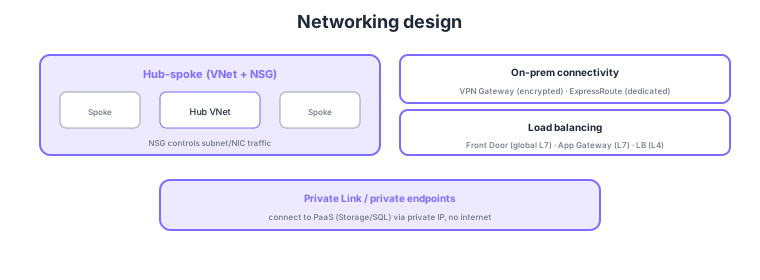
- VNet/subnets/NSG: isolate with virtual networks; control subnet/NIC traffic with NSG.
- Hub-spoke: centralize shared services in a hub VNet, peering spokes (or Virtual WAN).
- VPN Gateway/ExpressRoute: on-prem connectivity. VPN = encrypted (S2S/P2S), ExpressRoute = dedicated (low-latency/stable).
- Private Link: connect to PaaS (Storage/SQL, etc.) via private IP, avoiding public exposure.
Common on AZ-305: subnet/NIC traffic control = NSG, consolidate many VNets = hub-spoke/Virtual WAN, encrypted on-prem = VPN Gateway, dedicated = ExpressRoute, private PaaS connectivity = Private Link/private endpoints, global L7 = Front Door, regional L7 = App Gateway, L4 = Load Balancer.
AZ-305 networking design probes "composing isolation, connectivity, protection, and exposure control with the topology and services that fit requirements." Isolate the base VNet/subnets with NSGs (allow/deny per subnet/NIC) and ASGs (group by role), and for egress control/inspection place Azure Firewall (FQDN filtering/IDPS/DNAT) or an NVA in a hub. At scale, choose hub-spoke (shared services in a hub, spokes peered) or Virtual WAN (managed inter-hub connectivity) to simplify operations. For on-prem, choose VPN Gateway (encrypted tunnel over the internet, S2S/P2S, cheap but bandwidth/latency depend on the line) and ExpressRoute (dedicated, low-latency/stable/high-bandwidth with SLA; pair both for redundancy) by requirement. For load balancing and edge, combine by layer and scope: Load Balancer (L4), Application Gateway (L7, WAF/path-based), Front Door (global L7 + CDN + WAF + fast failover), Traffic Manager (DNS routing). To limit PaaS exposure, distinguish Private Link/private endpoints (expose PaaS via a private IP inside the VNet, no internet) from the looser service endpoints (optimal path from the VNet but the public IP remains). The key is to choose a topology meeting least exposure (private connectivity), least privilege (NSG/Firewall), and redundant connectivity (VPN + ExpressRoute, zone redundancy).
| Goal | Service | Key point |
|---|---|---|
| Subnet/NIC traffic control | NSG / ASG | Allow/deny rules; group by role |
| Connect many VNets | Hub-spoke / Virtual WAN | Centralize shared services; simpler ops |
| On-prem connectivity | VPN Gateway / ExpressRoute | Encrypted tunnel / dedicated, SLA |
| Limit PaaS exposure | Private Link / service endpoints | Private IP / optimal path (public IP remains) |
Scenario: Govern multiple departments’ VNets, connect to on-prem with low latency and stability, and keep Storage/SQL off the public internet. → Consolidate topology with hub-spoke (or Virtual WAN) hosting shared firewall/gateway; use ExpressRoute as primary and VPN Gateway as backup for on-prem redundancy. Expose Storage/SQL only via private endpoints (Private Link) from private IPs inside the VNet, disabling public access. Restrict inter-subnet traffic to least-allow with NSG/Azure Firewall.
FAQ: Private Link (private endpoints) vs service endpoints? A private endpoint exposes PaaS as a private IP inside the VNet, with traffic over the Microsoft backbone and no public path (strictest; reachable from on-prem too). Service endpoints provide an optimal path from the VNet, but the resource’s public endpoint remains. To fully cut public exposure, choose private endpoints.
Exam trap: Choosing service endpoints to "fully hide PaaS from the internet" is insufficient—they only optimize the path while the public endpoint remains; the answer is private endpoints (Private Link). Also, NSGs filter at L3/L4—if you need FQDN-based egress control or IDPS, use Azure Firewall; don’t conflate them.
4.3.2Section summary
- Foundation = VNet/subnets/NSG + hub-spoke
- On-prem = VPN/ExpressRoute / private PaaS = Private Link
Sign in to track progress — Log in.
Quick check
(just a quick review)Q1. Centralize shared services (firewall/DNS) for many VNets and let each VNet use them. Which design?
Q2. Connect on-prem to Azure via a low-latency, stable dedicated link. What?
Q3. Connect to PaaS (Storage/SQL) via a private IP without traversing the internet. What?
Keep track of your progress
The full study guide is free to read. Sign up free to practice with the question bank, track what you have read, review your mistakes, and highlight passages.