

What's changed: Created AZ-120 Chapter 1 (Domain 1: target requirements & sizing (SAPS/HANA memory, SAP-certified VMs, supported scenarios, quota, licensing, cost), migration strategy (lift-and-shift/lift-shift-migrate/lift-shift-migrate to HANA, Azure Migrate); Azure environment (Azure RBAC, Entra ID auth, Azure Policy governance, management hierarchy, SAP landing zone); SAP RISE integration (managed-service, VNet peering/private endpoints/ExpressRoute, data archiving, Entra ID integration)).
1.1Target requirements, sizing, and migration strategy
Understand estimating target sizing, supported scenarios, compute/storage/network requirements, licensing/cost, and choosing between lift-and-shift and migration approaches for SAP workloads on Azure.
Migrating SAP workloads (SAP HANA / NetWeaver / Business Suite) to Azure starts by measuring the current system and mapping it to SAP-certified Azure configurations. Meeting SAP support requirements is the prerequisite.
1.1.1Sizing and supported scenarios
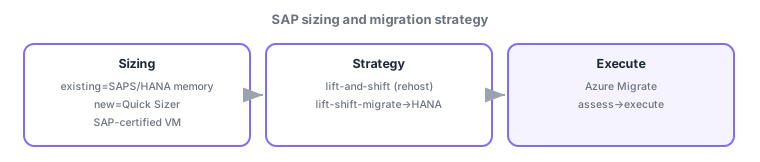
Target sizing estimates the needed SAP-certified VMs from the existing system’s SAPS (SAP Application Performance Standard) or HANA memory requirements (greenfield uses SAP Quick Sizer). Supported scenarios on Azure are defined by SAP Notes and the certification list; compute/storage/network must meet SAP requirements (IOPS, throughput, latency). Plan also for subscription models/quota constraints (vCPU quota, regional availability), software licensing (BYOL), cost implications, and an appropriate Azure support plan.
1.1.2Migration strategy and tools
Three approaches: lift-and-shift (rehost OS/DB as-is to VMs—fastest but no optimization), lift-shift-migrate (optimize during migration), and lift-shift-migrate to HANA (convert the DB to SAP HANA as part of migration). Choose by requirements (downtime tolerance, DB conversion). Tools include Azure Migrate for large data plus SAP/DB replication migration (DMO, etc.). For "fast with minimal change," lift-and-shift; for "convert to HANA at the same time," lift-shift-migrate to HANA.
Cues: "size to SAP-certified VMs" = estimate from SAPS/HANA memory. "fast rehost, minimal change" = lift-and-shift. "optimize during migration" = lift-shift-migrate. "convert DB to HANA" = lift-shift-migrate to HANA. Supportability is judged by SAP Notes/certification list.
Watch the mix-ups: (1) Non-certified VMs/configs are unsupported—always check the certification list. (2) Lift-and-shift (rehost) vs lift-shift-migrate (optimize). (3) Sizing is SAPS/HANA-memory-based—do not pick VMs by guess. (4) Quota/regional availability constrains large VMs.
1.1.3Section summary
- Size to SAP-certified VMs from SAPS/HANA memory; verify support via SAP Notes/certification list
- Migration = lift-and-shift (rehost) / lift-shift-migrate (optimize) / lift-shift-migrate to HANA (DB convert)
- Include quota, licensing, cost, and support plan in the plan
Sign in to track progress — Log in.
Quick check
(just a quick review)Q1. You want to choose appropriate Azure VMs from the existing SAP system’s SAPS and HANA memory requirements. Best?
Q2. You want minimal downtime and the fastest rehost of OS and DB unchanged to Azure VMs. Best migration strategy?
Q3. You want to convert the existing DB to SAP HANA as part of migration. Best strategy?
Q4. You want to verify whether an SAP configuration on Azure is supported. Best?
Q5. Which tool helps plan migration of data-heavy SAP servers to Azure VMs?
Keep track of your progress
The full study guide is free to read. Sign up free to practice with the question bank, track what you have read, review your mistakes, and highlight passages.