

What's changed: Deepened ANS-C01 Chapter 6 (SG/NACL eval order/SG references/ephemeral, inspection VPC routing/appliance mode/firewall remits, Shield Adv/WAF Web ACL/Firewall Mgr prereqs/ACM Region + tables, scenarios, FAQ, traps; ja figures)
6.3DDoS Protection and Governance
Attacks and governance—understand Shield Standard/Advanced, WAF, Firewall Manager, certificate management (ACM), and org-wide policy. Apply protection and control across the board.
Handle external attacks with Shield (DDoS) and WAF (L7), and use Firewall Manager to apply policies centrally across many accounts and resources.
6.3.1Protection and central governance
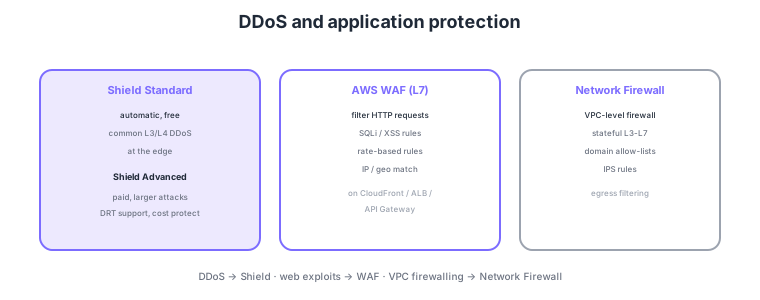
- Shield Standard: automatic and free, mitigating common L3/L4 DDoS at the edge.
- Shield Advanced: paid. Advanced protection for large attacks, SRT support and cost protection.
- WAF: filters HTTP at L7. SQLi/XSS, rate-based rules, IP/geo match.
- Firewall Manager: centrally apply WAF/Shield/SG/Network Firewall policies org-wide for governance.
Common on ANS-C01: L3/L4 DDoS = Shield (large attacks/cost protection = Advanced), L7 SQLi/XSS and rate limiting = WAF, enforce rules org-wide = Firewall Manager, and manage/auto-renew TLS certs = ACM. To enforce the same WAF rules across accounts, use Firewall Manager.
ACM (AWS Certificate Manager) issues and auto-renews TLS certificates for free, integrating with CloudFront, ALB, and API Gateway to enable HTTPS easily.
ANS-C01 tests Shield Advanced’s concrete value, WAF’s rule structure, Firewall Manager’s prerequisites, and ACM’s Region constraints. Shield Advanced is more than stronger DDoS defense: it bundles automatic application-layer mitigation for protected resources (CloudFront/ALB/NLB/Global Accelerator/EIP/Route 53), cost protection (refunds for usage spikes from scaling during an attack), 24/365 SRT (Shield Response Team) support, and integration with Route 53 Application Recovery Controller. WAF groups rules into a Web ACL, composed internally of rule groups (AWS-managed or your own), each rule having a priority and an action of Allow/Block/Count/CAPTCHA. Rate-based rules curb excessive requests per time window, and Count mode validates a new rule without blocking production. Firewall Manager requires AWS Organizations and AWS Config enabled plus a designated administrator account; with these it auto-applies WAF/Shield Advanced/SG/Network Firewall/Resolver DNS Firewall policies across all accounts and continuously enforces them on new accounts and resources (auto-remediating non-compliance). ACM requires the certificate for CloudFront to be issued in us-east-1 (N. Virginia), whereas ALB/API Gateway use a certificate in the same Region as the resource. ACM-issued certificates cannot be exported (ACM PCA private CA is separate), and auto-renewal runs unattended when you use DNS validation.
| Feature | Role | Key point/prerequisite |
|---|---|---|
| Shield Standard | Auto L3/L4 DDoS mitigation | Free, automatic for all |
| Shield Advanced | Advanced, cost protection, SRT | Paid, designate protected resources |
| WAF | L7 filtering (Web ACL) | Rule groups, rate, Count mode |
| Firewall Manager | Org-wide policy enforcement | Organizations + Config + admin account |
| ACM | Issue/auto-renew TLS certs | us-east-1 for CloudFront |
Scenario: in a 50-account org, enforce common AWS-managed rules (SQLi/XSS) plus a custom rate limit on every ALB, auto-applied to new accounts. → Create a Firewall Manager WAF policy scoped to "ALBs in all accounts." Prerequisites: enable Organizations and AWS Config and designate the Firewall Manager admin account. New ALBs automatically receive the rules and non-compliance is auto-remediated.
FAQ: Q. Can’t select the ACM cert for CloudFront? A. The CloudFront cert must be issued in us-east-1 (ALB/API GW use the same Region). Q. Worried a new rule blocks legitimate users? A. Run it in WAF Count mode to log only for a while, confirm false positives, then switch to Block. Q. Shield Advanced benefits? A. Cost protection, SRT support, automatic L7 mitigation.
Trap: "Firewall Manager works standalone" is false—it requires AWS Organizations and AWS Config enabled and a designated admin account. Also "download the ACM cert to install on on-prem gear" is wrong: ACM-issued certs cannot be exported (use ACM Private CA for that). The Region for the CloudFront cert (us-east-1) is another classic trap.
6.3.2Section summary
- DDoS = Shield; web exploits = WAF; central governance = Firewall Manager
- Certificates = ACM (free, auto-renew)
Sign in to track progress — Log in.
Quick check
(just a quick review)Q1. Filter SQL injection and malicious requests at L7 for a web app and apply rate limiting. What?
Q2. Enforce the same WAF and Shield policies across many accounts/resources org-wide. What?
Q3. You need advanced protection against large DDoS attacks plus cost protection and expert team support. What?
Keep track of your progress
The full study guide is free to read. Sign up free to practice with the question bank, track what you have read, review your mistakes, and highlight passages.