

What's changed: In-scope coverage: added compute/scaling/storage (EC2 Auto Scaling/AWS Auto Scaling/ECS/Fargate/Lambda/S3)
4.2Implementing and Choosing Load Balancers
Distribute traffic—understand ALB (L7), NLB (L4), GWLB, target groups/health checks, and cross-zone load balancing. Choose by layer and requirements.
Elastic Load Balancing offers ALB (application), NLB (network), and GWLB (gateway). Choose by the OSI layer they operate at and your requirements.
4.2.1Three load balancer types
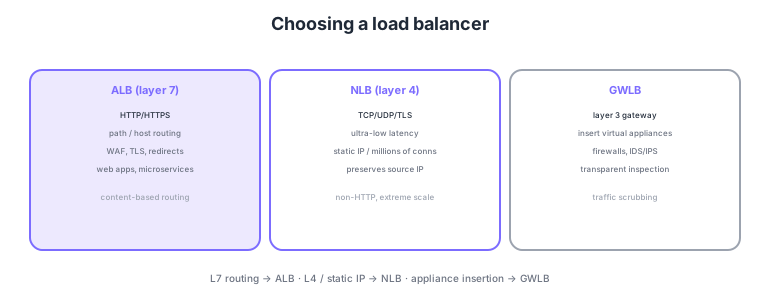
- ALB (L7): HTTP/HTTPS. Path/host-based routing, WAF, TLS. For web apps/microservices.
- NLB (L4): TCP/UDP/TLS. Ultra-low latency, static IP, massive connections, preserves source IP. For non-HTTP.
- GWLB: transparently inserts virtual appliances (firewall/IDS/IPS) to inspect traffic.
- Target groups/health checks: group targets and automatically remove unhealthy ones.
Common on ANS-C01: route by path/host = ALB (L7), static IP / ultra-low latency / TCP·UDP = NLB (L4), and insert appliances like firewalls = GWLB. Choose NLB when static IP is required and ALB for content-based routing.
Enabling cross-zone load balancing spreads traffic evenly across targets in all AZs even if target counts per AZ differ.
ANS-C01 frequently tests the cost difference of cross-zone load balancing, source-IP preservation, and how GWLB works. Cross-zone load balancing is always on and free across AZs for ALB, but off by default for NLB and GWLB (enabling it makes inter-AZ data transfer billable); left off, traffic spreads only within each AZ, so per-AZ target imbalance becomes load imbalance. For source IP, an NLB (instance-ID targets) and GWLB preserve the client’s real IP, but using NLB with IP targets, or an ALB, hides it (proxy), so pass the original IP to the backend via the X-Forwarded-For header on ALB and Proxy Protocol v2 on NLB. GWLB encapsulates traffic with GENEVE (port 6081) to send it to inspection appliances; inserting a GWLB endpoint (GWLBe) into route tables transparently routes a source VPC’s traffic to an appliance fleet in a security VPC—the "inspection VPC" pattern. ALB can also target Lambda and supports weighted target groups for blue/green and A/B.
| Aspect | ALB | NLB | GWLB |
|---|---|---|---|
| Layer | L7 (HTTP/HTTPS) | L4 (TCP/UDP/TLS) | L3 gateway (GENEVE) |
| Static IP | No (DNS name) | Yes (per AZ) | Via GWLBe |
| Cross-zone | Always on, free | Off by default, billable if on | Off by default |
| Typical use | Content routing, WAF | Low latency, static IP, non-HTTP | Transparent FW/IDS/IPS insertion |
Scenario: inspect all VPC ingress/egress with a third-party firewall without changing app-side routing. → Place the appliance fleet plus a GWLB in a security VPC, create GWLB endpoints (GWLBe) in each app VPC’s subnets, and point route tables at the GWLBe. Traffic is GENEVE-encapsulated and inspected, protecting apps transparently with no config change.
FAQ: Q. Can’t get the client’s real IP behind an NLB? A. With IP-type targets the real IP isn’t preserved—use instance-ID targets or enable Proxy Protocol v2. Q. Load skewed because AZs have different target counts? A. Enable cross-zone load balancing (off by default on NLB/GWLB; mind inter-AZ transfer charges).
Trap: "use ALB because I want a static IP" is false—ALB has only a DNS name, no fixed IP. If a fixed IP is required, use NLB (per-AZ static IPs, EIP assignable) or front the ALB with an NLB or Global Accelerator. Conversely "use NLB to route by path" is wrong—L7 routing is ALB’s job.
4.2.2Section summary
- L7 routing = ALB / L4·static IP = NLB / appliance insertion = GWLB
- Health = target group health checks
Sign in to track progress — Log in.
Quick check
(just a quick review)Q1. Route to different backends based on URL path (/api vs /web). Which load balancer?
Q2. Handle massive TCP connections at ultra-low latency and provide static IPs. Which load balancer?
Q3. Transparently insert third-party firewall appliances into the traffic path for inspection. What?
Keep track of your progress
The full study guide is free to read. Sign up free to practice with the question bank, track what you have read, review your mistakes, and highlight passages.