

What's changed: Fixed out-of-area distractors in mini-quizzes q3/q4: NSG, TDE and VPN appear nowhere in the official AB-900 scope, so they were replaced with real features from the same area (group licensing on a distribution group, bulk role assignment via PIM, Conditional Access, sensitivity labels). Out-of-area terms let a candidate eliminate by unfamiliarity and answer without reading the stem. / Added per-section figures (cert-figure-retrofit). New AB-900 Chapter 1 (Domain 1 "Core M365 features and objects": core objects = licenses/admin centers (M365/Exchange/SharePoint/Teams)/objects and roles; security principles = three Zero Trust principles/authentication-authorization/threat protection/Defender XDR; core security features = Entra/conditional access/SSO/sign-in troubleshooting/Identity Secure Score/audit logs/PIM/app registrations-enterprise apps)
1.1Core objects of Microsoft 365 services
Understand how license assignment to users/groups affects access, organization configuration in the Microsoft 365 admin center, and the key objects configured in the Exchange Online, SharePoint, and Teams admin centers (mailboxes/distribution lists, sites/libraries, teams/channels/policies), plus roles and permissions.
Microsoft 365 is a cloud productivity suite bundling email (Exchange), file sharing (SharePoint/OneDrive), collaboration (Teams), productivity apps (Word/Excel, etc.), security and compliance (Entra/Purview/Defender), and Microsoft 365 Copilot and agents. AB-900 is the entry-level credential testing whether you can configure and govern these from an admin perspective, with emphasis on Copilot, agents, and data protection. First, the foundation: "licenses and objects" that determine who can use what.
1.1.1Licenses and access
Whether a user can use a Microsoft 365 feature (an Exchange mailbox, Copilot, etc.) depends on the assigned license type. Licenses are assigned directly to users or, at scale, via group-based licensing (assign to a group; members inherit). For example, Microsoft 365 Copilot requires a separate license, so only licensed users can use Copilot. Remember the basics: "feature unavailable = license not assigned."
1.1.2Admin centers and objects
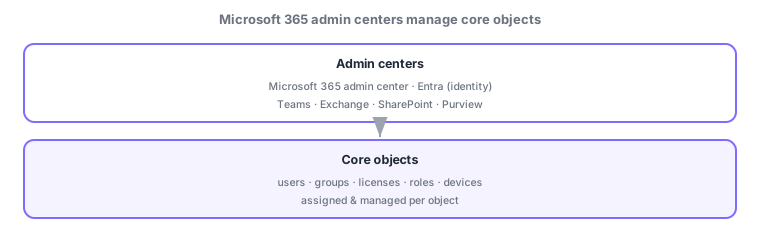
Microsoft 365 has a dedicated admin center per workload. Org-wide settings (domain names, org settings, users/licenses) live in the Microsoft 365 admin center; email (mailboxes, distribution lists) in the Exchange admin center; files/sites (sites, libraries, folders and their roles/permissions) in the SharePoint admin center; collaboration (teams, channels, policies) in the Teams admin center. The key skill is mapping "what you want to configure → which admin center."
| Admin center | Key objects | Example |
|---|---|---|
| Microsoft 365 admin center | Users, groups, licenses, org/domain settings | Add a domain; assign licenses |
| Exchange admin center | Mailboxes, distribution lists, mail flow | Create a shared mailbox |
| SharePoint admin center | Sites, libraries, folders, roles/permissions | Manage site sharing scope |
| Teams admin center | Teams, channels, policies | Apply a meeting policy |
Scenario: onboarding a new hire. Create the user and assign a Copilot-inclusive license in the Microsoft 365 admin center → verify the mailbox and distribution lists in the Exchange admin center → set their team (with channels/policies) in the Teams admin center → grant the right site role (permissions) in the SharePoint admin center. Use the appropriate admin center per workload.
Watch the mix-ups: (1) mailboxes/distribution lists = Exchange, sites/libraries = SharePoint, teams/channels/policies = Teams, users/licenses/org settings = Microsoft 365 admin center. (2) direct license assignment vs group-based licensing (at scale). (3) Copilot needs a separate license.
Common: target to configure → admin center. E.g., "create a mailbox" = Exchange; "site sharing/permissions" = SharePoint; "meeting policy" = Teams; "add a domain / assign licenses" = Microsoft 365 admin center; "auto-assign licenses to many users" = group-based licensing.
1.1.3Section summary
- Feature availability depends on licenses (direct or group-based); Copilot needs a separate license
- Admin centers are per workload: M365 (org/users/licenses) / Exchange (email) / SharePoint (sites/permissions) / Teams (teams/policies)
- The exam centers on "what to configure → which admin center" and "objects and roles"
Sign in to track progress — Log in.
Quick check
(just a quick review)Q1. Which admin center configures mailboxes and distribution lists?
Q2. Which admin center configures sites, libraries, and site roles (permissions)?
Q3. Which efficiently assigns licenses to many users?
Q4. What is required for a user to use Microsoft 365 Copilot?
Q5. Which admin center configures teams, channels, and policies?
Q6. Which central admin center handles domain names, org-wide settings, and user/license management?
Keep track of your progress
The full study guide is free to read. Sign up free to practice with the question bank, track what you have read, review your mistakes, and highlight passages.